
Qbsプロファイルの編集
キットに関連付けられている Qbs プロファイルを表示するには、[Preferences ] > [Qbs ] > [Profiles] を選択します。
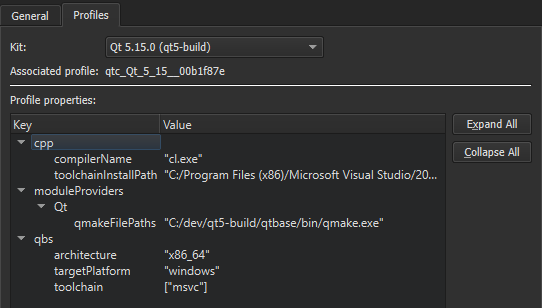
プロファイルへのキーや値の追加・削除、および既存の値の変更が可能です。利用可能なキーと値の一覧については、『Qbsマニュアル』の「モジュール一覧」を参照してください。
キットに関連付けられた Qbs プロファイルを編集するには:
- 「Preferences 」 > 「Kits 」でキットを選択し、「Qbs profile additions 」の横にある「Change 」を選択して、「Custom Properties 」ダイアログを開きます。
![[カスタムプロパティ] ダイアログ](images/qtcreator-qbs-profile-settings.png "[カスタムプロパティ] ダイアログ")
- 「Key 」列の空のセルをダブルクリックし、追加または変更するキーを「
<module_name>.<property_name>」として指定します。 - 「Value 」列の同じ行にあるセルをダブルクリックし、JSON リテラルとして値を指定します。
- 「Add 」を選択して、キーと値のペアを追加します。
- 「OK 」を選択します。
既存の値を変更するには、[Value ] フィールド内のその値をダブルクリックします。
選択したプロパティを削除するには、[Remove] を選択します。
「プロジェクトのキットの有効化」、「キットの追加」、および「キットの管理」も参照してください 。
Copyright © The Qt Company Ltd. and other contributors. Documentation contributions included herein are the copyrights of their respective owners. The documentation provided herein is licensed under the terms of the GNU Free Documentation License version 1.3 as published by the Free Software Foundation. Qt and respective logos are trademarks of The Qt Company Ltd in Finland and/or other countries worldwide. All other trademarks are property of their respective owners.
