
キットの追加
Qt Creator プロジェクトのビルドおよび実行に使用される設定をキットとしてグループ化し、クロスプラットフォームおよびクロス構成での開発を容易にします。 各キットは、デバイス、コンパイラ、Qt のバージョン、使用するデバッガーのコマンドなど、1 つの環境を定義する一連の値と、キットのアイコンや名前などのメタデータで構成されています。キットを定義したら、それを選択してプロジェクトをビルドおよび実行できます。
デスクトップ用および以下の種類のデバイス用のキットを追加できます:
- Android
- Bare Metal
- Boot to Qt (商用版のみ)
- Docker(実験的)
- iOS
- iOS シミュレータ
- MCU(商用版のみ)
- QNX
- リモートLinux
- VxWorks
- WebAssemblyランタイム
キットを追加するには:
- 「Preferences 」 > 「Kits 」を選択します。
- Add を選択して空のキットから開始するか、Clone を選択して選択したキットをクローンし、その設定を編集します。
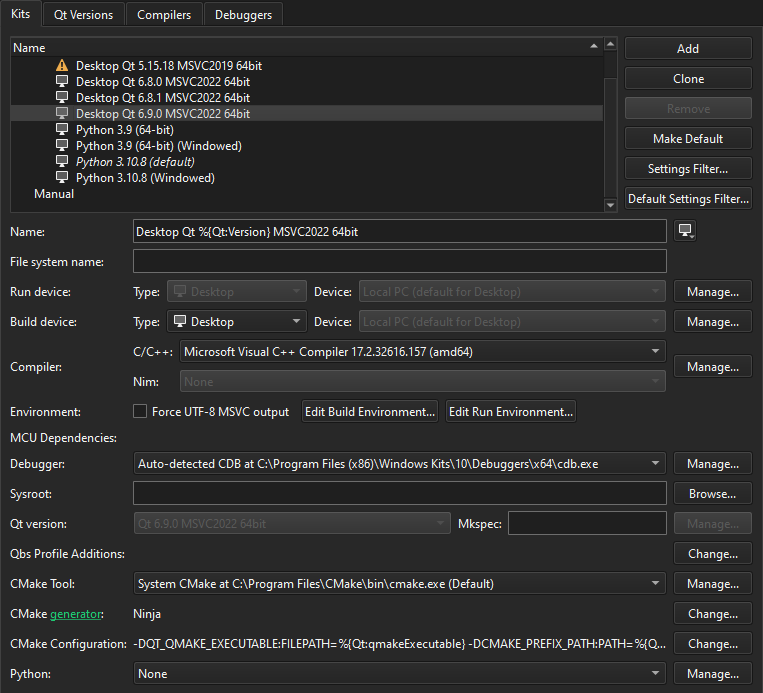
- ビルドシステムおよびデバイスの種類に応じて、キットの設定を行います。
- 「Apply 」を選択してキットを作成します。
デフォルトのキットを設定する
Qt Creator には、使用するキットを選択するための情報が不十分な場合、デフォルトのキットが使用されます。選択したキットをデフォルトのキットとして設定するには、[Make Default] を選択します。
「手順:キットの管理」および「キットの管理」も参照してください 。
Copyright © The Qt Company Ltd. and other contributors. Documentation contributions included herein are the copyrights of their respective owners. The documentation provided herein is licensed under the terms of the GNU Free Documentation License version 1.3 as published by the Free Software Foundation. Qt and respective logos are trademarks of The Qt Company Ltd in Finland and/or other countries worldwide. All other trademarks are property of their respective owners.
