
シンボルの名前変更
プロジェクト内のすべてのファイルでシンボルの名前を変更できます。
C++ シンボルの名前変更
クラスの名前を変更すると、そのクラス名と一致するファイル名も変更できます。
プロジェクト内の C++ シンボル名を変更するには:
- エディタでシンボルにカーソルを合わせます。
- 「Tools 」>「C++ 」>「Rename Symbol Under Cursor 」の順に選択するか、Ctrl+Shift+R キーを押します。
Pythonシンボルの名前を変更するには、キーボードショートカットを使用します。
QML タイプの名前を変更する
プロジェクト内の QML タイプの名前を変更するには:
- 「Tools 」>「QML/JS 」>「Rename Symbol Under Cursor 」に移動するか、Ctrl+Shift+R を選択します。
- Projects へ移動し、コンテキストメニューから「Rename 」を選択して、QML タイプを定義する QML ファイルの名前を変更します。「Qt Creator 」では、プロジェクト内の他のファイルにあるそのタイプ名のすべての使用箇所も同時に名前変更するかどうかを尋ねられます。
見つかったシンボルのインスタンスを置換
Search Results には、現在のプロジェクト内でのそのシンボルの出現位置と出現回数が表示されます。
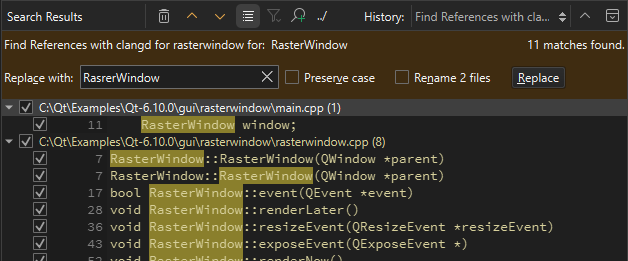
選択したすべてのインスタンスを置換するには、[Replace with] に新しいシンボルの名前を入力し、[Replace] を選択します。インスタンスを置換対象から除外するには、そのインスタンスの横にあるチェックボックスをオフにします。
注: この操作により 、「Search Results 」にリストされているすべてのファイル内の、選択されたシンボルのインスタンスがすべて置換されます。この操作は元に戻すことはできません。
シンボルがクラスの場合は、「Rename files 」を選択すると、そのクラス名と一致するファイル名も変更されます。
注: ローカルシンボルの名前変更を行っても 、Search Results は開かれません。シンボルのインスタンスはコード内で強調表示され、シンボルを編集できます。入力するにつれて、ローカルシンボルのすべてのインスタンスが変更されます。
関連項目: クイックフィックスの適用、シンボルの検索、クイックフィックスの設定の指定、QML クイックフィックス、クイックフィックス、およびC++ クイックフィックス。
Copyright © The Qt Company Ltd. and other contributors. Documentation contributions included herein are the copyrights of their respective owners. The documentation provided herein is licensed under the terms of the GNU Free Documentation License version 1.3 as published by the Free Software Foundation. Qt and respective logos are trademarks of The Qt Company Ltd in Finland and/or other countries worldwide. All other trademarks are property of their respective owners.
