
Pythonアプリケーションの実行
Qt for Python アプリケーションは、Qt Creator から直接実行できます。新しいプロジェクトウィザードを使用してアプリケーションプロジェクトを作成した場合、「Run 」ボタンを選択すると、main.py ファイルが自動的に実行されます。
Pythonの実行設定を指定する
キット用に選択した「Run device」上でアプリケーションを実行するための設定を指定するには、[Projects ] > [Run Settings] に移動します。
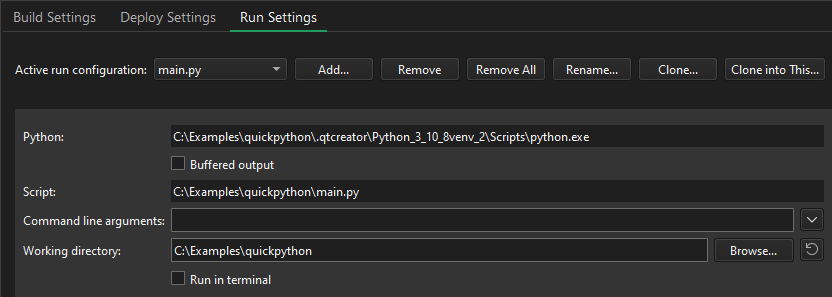
次の表に、Qt for Python アプリケーションの実行設定の概要を示します。
| 設定 | 値 |
|---|---|
| Python | Python 実行ファイルへのパス。 |
| Buffered output | 出力をバッファに格納します。これにより、出力のパフォーマンスは向上しますが、出力に遅延が生じます。 |
| Script | 実行されるプロジェクトのメインファイルへのパスを表示します。 |
| Command line arguments | 実行ファイルに渡すコマンドライン引数。 |
カスタム実行構成を指定する
main.py 以外の Python ファイルを実行するには、カスタム実行構成を作成します。
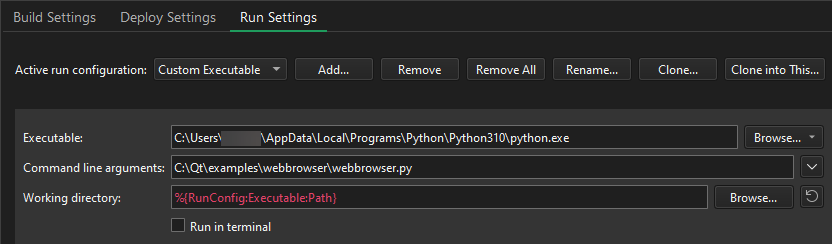
- 「Add 」>「Custom Executable 」を選択します。
- 「Executable 」フィールドで、Python 実行ファイルへのパスを指定します。
- 「Command line arguments 」フィールドで、実行するPythonファイルを選択します。
「プロジェクトのキットの有効化」、「実行のためのプロジェクトの設定」、「 Qt for Python アプリケーションの作成」、「 Qt for Python アプリケーションの開発」も参照してください 。
Copyright © The Qt Company Ltd. and other contributors. Documentation contributions included herein are the copyrights of their respective owners. The documentation provided herein is licensed under the terms of the GNU Free Documentation License version 1.3 as published by the Free Software Foundation. Qt and respective logos are trademarks of The Qt Company Ltd in Finland and/or other countries worldwide. All other trademarks are property of their respective owners.
