
ST-Link のセットアップ
ST-LINK Utilityは、STM32マイコンのプログラミングに使用されます。
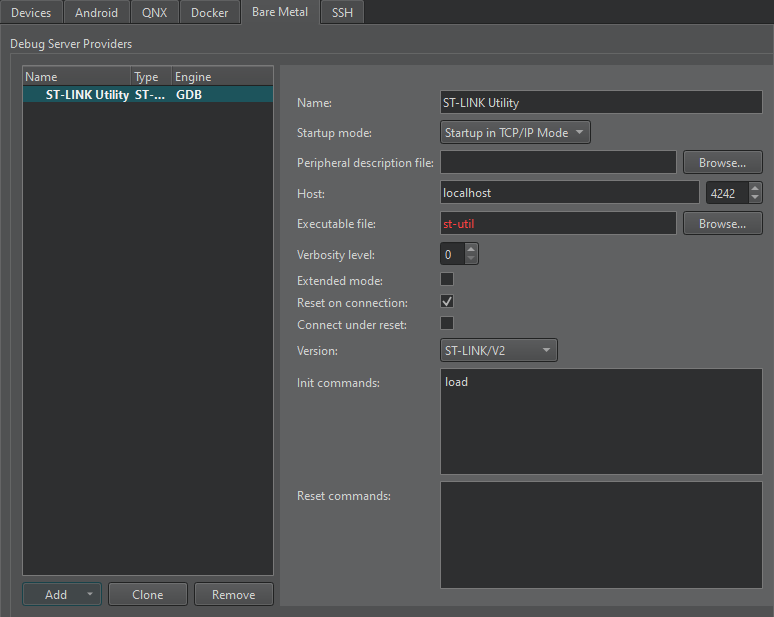
ST-Linkの設定を行うには:
- 「Preferences 」>「Devices 」> Bare Metal.
- 「Add 」を選択します。
- 「St-Link 」を選択します。
- 「Name 」で、接続の名前を入力します。
- 「Startup mode 」で、デバッグ・サーバー・プロバイダを起動するモードを選択します。
- Peripheral description file で、デバイス上の周辺機器を記述したファイルへのパスを指定します。
- Host で、デバッグサーバープロバイダに接続するホスト名とポート番号を選択します。
- Executable file で、デバッグサーバープロバイダの実行ファイルへのパスを入力します。
- [Verbosity level] で、詳細ログのレベルを入力します。
- Extended mode を選択すると、接続が切断された後も接続要求のリスニングを継続します。
- Reset on connection を選択すると、接続が確立されたときにボードがリセットされます。
- 「Version 」で、デバイスがサポートするトランスポート層のタイプを選択します。
- 「Init commands 」で、接続の初期化時に実行するコマンドを入力します。
- 「Reset commands 」で、接続のリセット時に実行するコマンドを入力します。
- 「Apply 」を選択して、デバッグ サーバー プロバイダーを追加します。
「Bare Metal 向けの開発方法」および「 Bare Metal デバイス向けの開発」も参照してください 。
Copyright © The Qt Company Ltd. and other contributors. Documentation contributions included herein are the copyrights of their respective owners. The documentation provided herein is licensed under the terms of the GNU Free Documentation License version 1.3 as published by the Free Software Foundation. Qt and respective logos are trademarks of The Qt Company Ltd in Finland and/or other countries worldwide. All other trademarks are property of their respective owners.
