
uVision IDEの設定
uVisionは、組み込みデバイス向けアプリケーションを開発するためのIDEです。アプリケーションのデバッグには、uVisionシミュレータを使用するか、St-LinkやJ-Linkを使用してハードウェア上で直接デバッグを行います。
デバッグモードの「Peripheral Registers 」ビューには、周辺機器レジスタの現在の状態が表示されます。このビューはデフォルトでは非表示になっています。
uVisionシミュレータ
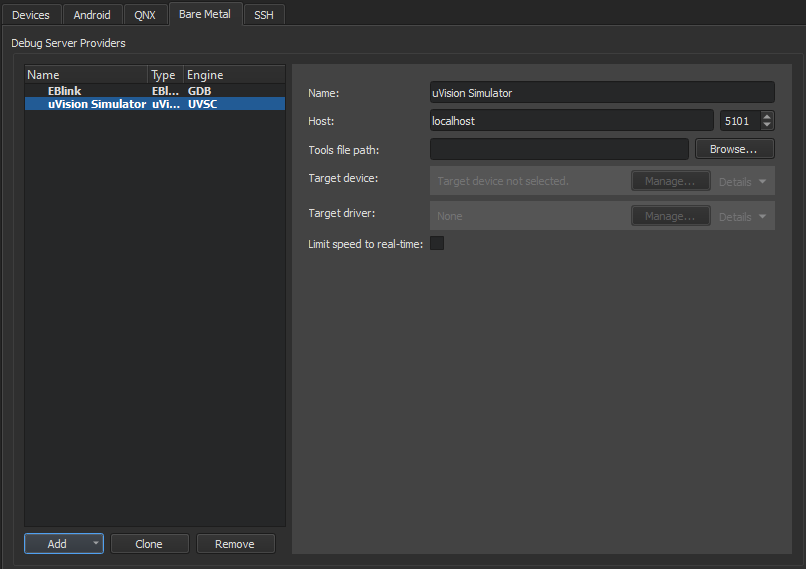
}
uVision Simulatorの設定を行うには:
- 「Preferences 」>「Devices 」> Bare Metal.
- 「Add 」を選択します。
- 「uVision Simulator 」を選択します。
- 「Name 」で、接続の名前を入力します。
- 「Host 」で、デバッグサーバープロバイダに接続するためのホスト名とポート番号を選択します。
- Tools file path で、Keil ツールセットの設定ファイルへのパスを入力します。
- Target device で、デバッグするデバイスを選択します。
- Target driver で、ターゲットデバイスに接続するためのドライバを選択します。
- 接続速度を制限するには、[Limit speed to real-time ] を選択します。
- Apply を選択して、デバッグサーバープロバイダを追加します。
uVision St-Link または JLink デバッガ
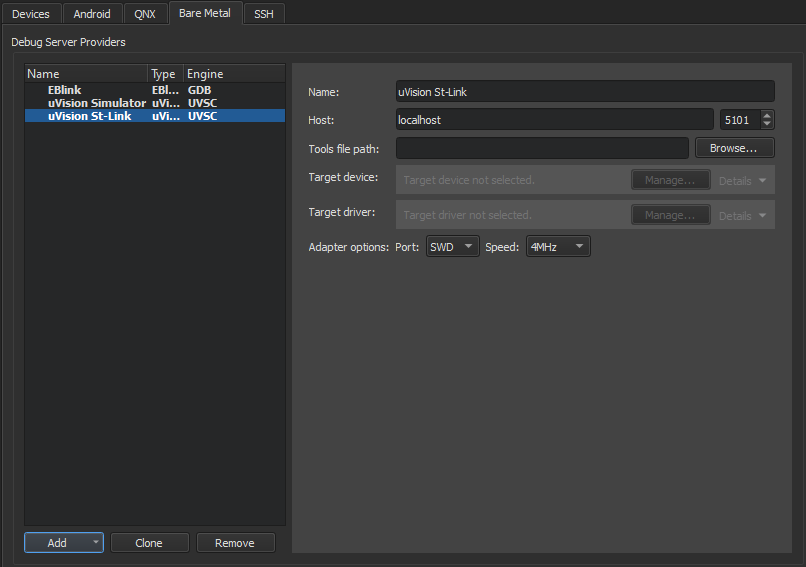
uVision St-Link または JLink デバッガの設定を行うには:
- [Preferences ] > [Devices ] > Bare Metalを選択します。
- 「Add 」を選択します。
- 「uVision St-Link or uVision JLink 」を選択します。
- 「Name 」で、接続の名前を入力します。
- 「Host 」で、デバッグサーバープロバイダに接続するためのホスト名とポート番号を選択します。
- Tools file path で、Keil ツールセットの設定ファイルへのパスを入力します。
- Target device で、デバッグするデバイスを選択します。
- Target driver で、ターゲットデバイスに接続するためのドライバを選択します。
- 「Adapter options 」で、アダプタインターフェースのタイプと速度(MHz)を指定します。
- 「Apply 」を選択して、デバッグサーバープロバイダを追加します。
「Bare Metal 向けの開発方法」および「 Bare Metal デバイス向けの開発」も参照してください 。
Copyright © The Qt Company Ltd. and other contributors. Documentation contributions included herein are the copyrights of their respective owners. The documentation provided herein is licensed under the terms of the GNU Free Documentation License version 1.3 as published by the Free Software Foundation. Qt and respective logos are trademarks of The Qt Company Ltd in Finland and/or other countries worldwide. All other trademarks are property of their respective owners.
