
자동 완성 메뉴에 코드 스니펫 추가하기
스니펫 편집기에서 코드 또는 텍스트 스니펫을 추가하려면:
- Preferences > Text Editor > Snippets 을 선택합니다.
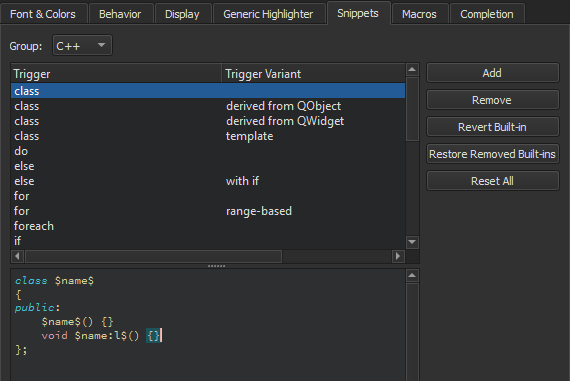
- ‘ Group ’에서 추가할 스니펫 유형을 선택합니다.
- Add 를 선택합니다.
- 트리거를 지정합니다. 트리거가 이미 사용 중이라면 선택 사항인 변형을 추가할 수 있습니다. 코드를 작성할 때 제안 목록에 표시됩니다. 또한 스니펫 카테고리에 따라 스니펫 편집기에서 텍스트 문자열이나 C++ 또는 QML 코드 구문을 지정합니다.
스니펫 내에서 미리 정의된 변수를 사용할 수 있습니다.
관련 항목: CMake 코드 자동 완성, 코드 자동 완성, Qt Creator 변수 사용, 자동 완성, Nim 및 스니펫.
Copyright © The Qt Company Ltd. and other contributors. Documentation contributions included herein are the copyrights of their respective owners. The documentation provided herein is licensed under the terms of the GNU Free Documentation License version 1.3 as published by the Free Software Foundation. Qt and respective logos are trademarks of The Qt Company Ltd in Finland and/or other countries worldwide. All other trademarks are property of their respective owners.
