
편집기 구성
에디터 환경 설정을 지정합니다.
에디터 글꼴과 색상을 설정하려면 ‘ Preferences ’ > ‘ Text Editor ’ > ‘ Font & Colors ’을 선택합니다.
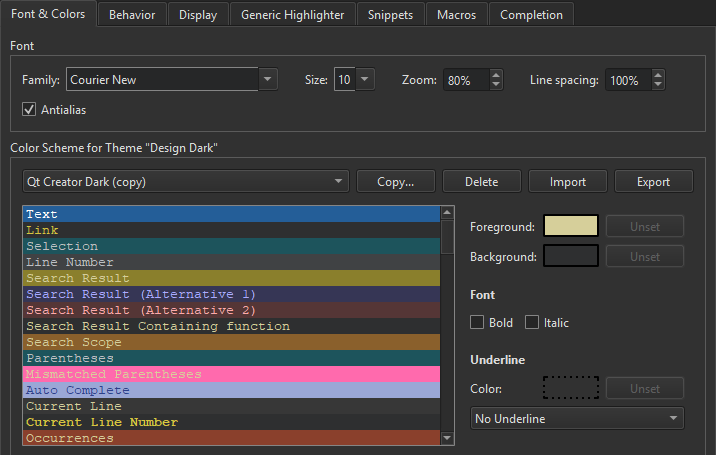
글꼴 구성
글꼴 종류와 크기를 선택할 수 있습니다. 텍스트를 볼 때 사용할 확대/축소 비율을 백분율로 지정할 수 있습니다. 또한 Ctrl + + 또는 Ctrl + -를 누르거나, Ctrl 키를 누른 상태에서 마우스 휠을 돌려서 확대 또는 축소할 수도 있습니다. 마우스 휠 기능을 비활성화하려면 ‘ Preferences ’ > ‘ Text Editor ’ > ‘ Behavior ’를 선택하고 ‘ Enable scroll wheel zooming ’의 체크를 해제하십시오.
편집기 내 텍스트의 가독성을 높이려면 ‘ Line spacing ’ 필드에서 줄 간격을 조정하십시오.
안티앨리어싱은 기본적으로 적용되어 화면에서 텍스트가 더 매끄럽고 가독성 있게 표시됩니다. 안티앨리어싱을 해제하려면 ‘ Antialias ’의 선택을 해제하십시오.
'편집기 구성 방법' 및 '편집기'항목도 참조하십시오 .
Copyright © The Qt Company Ltd. and other contributors. Documentation contributions included herein are the copyrights of their respective owners. The documentation provided herein is licensed under the terms of the GNU Free Documentation License version 1.3 as published by the Free Software Foundation. Qt and respective logos are trademarks of The Qt Company Ltd in Finland and/or other countries worldwide. All other trademarks are property of their respective owners.
