
프로젝트에 대한 CMake 설정 재정의
현재 프로젝트의 CMake 설정을 재정의하려면:
- Projects > Project Settings > CMake 로 이동합니다.
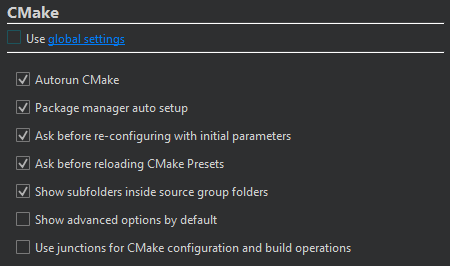
- Use global settings 를 지웁니다.
- 프로젝트에 대한 CMake를 구성합니다.
이때 선택한 내용은 ‘ Preferences ’ > ‘ CMake ’ > ‘ General ’에서 설정한 값을 재정의합니다.
| 설정 | 값 | 자세히 보기 |
|---|---|---|
| Autorun CMake | 프로젝트에서 CMakeLists.txt 구성 파일을 편집할 때 CMake를 실행하여 프로젝트 정보를 새로 고칩니다. 또한, 프로젝트를 빌드할 때도 프로젝트 정보를 새로 고칩니다. | CMake 프로젝트 내용 보기 |
| Clear old CMake output on a new run | CMake를 다시 실행할 때 이전 출력 결과를 삭제합니다. | CMake 출력 보기 |
| Package manager auto setup | CMake와 함께 사용할 수 있도록 Conan 또는 vcpkg 패키지 관리자를 설정합니다. | 패키지 관리자와 함께 CMake 사용하기 |
| Maintenance Tool dependency provider | Qt Online Installer 를 사용하여 누락된 Qt 모듈을 설치합니다. | 누락된 Qt 패키지 설치 |
| Ask before re-configuring with initial parameters | Re-configure with Initial Variables 를 선택했을 때 실행 전에 확인을 요청합니다. | 초기 변수를 사용하여 재구성 |
| Ask before reloading CMake presets | Build 로 이동하여 ‘ Reload CMake Presets ’을 선택할 때, 실행 전에 확인 메시지를 표시합니다. | CMake 사전 설정 |
| Show subfolders inside source group folders | Projects 보기에서 하위 폴더 이름을 숨기고 소스 그룹에 따라 파일을 정렬합니다. | 프로젝트 뷰에서 하위 폴더 이름 숨기기 |
| Show advanced options by default | Initial Configuration 및 Current Configuration 에서 기본적으로 모든 CMake 변수를 표시합니다. | 고급 변수 보기 |
| Use junctions for CMake configuration and build operations | Windows에서 CMake의 configure, build 및 install 작업에 접합점(junction point)을 사용합니다. | Windows에서 접합점 사용 |
이러한 기본 설정을 CMake 구성 사전 설정으로 설정하거나 CMakeLists.txt.shared 파일에서 설정할 수 있습니다.
참조: 사용 방법: CMake로 빌드하기, CMake, 프로젝트 빌드 및 실행.
Copyright © The Qt Company Ltd. and other contributors. Documentation contributions included herein are the copyrights of their respective owners. The documentation provided herein is licensed under the terms of the GNU Free Documentation License version 1.3 as published by the Free Software Foundation. Qt and respective logos are trademarks of The Qt Company Ltd in Finland and/or other countries worldwide. All other trademarks are property of their respective owners.
