
CMake 사전 설정
CMakePresets.json 에는 프로젝트 전체에 적용되는 빌드 옵션이 있는 반면, CMakeUserPresets.json 에는 로컬 빌드용 옵션이 있습니다.
CMake: cmake-presets(7) 에 설명된 형식으로 프리셋 파일을 생성하여 프로젝트의 루트 디렉터리에 저장하십시오. 그러면 프로젝트 ( Projects ) 뷰에서 해당 파일을 확인할 수 있습니다.
Qt Creator 는 버전 10(CMake 3.31에서 도입됨)까지의 configure, build 및 test 프리셋을 지원하지만, 버전 검사를 강제하지는 않습니다. 버전 10의 모든 필드가 존재하면 이를 읽어와 사용합니다.
CMakeLists.txt.user 파일이 없거나 프로젝트에서 모든 키트를 비활성화한 상태에서 프로젝트를 처음 열 때 프리셋을 가져올 수 있습니다.
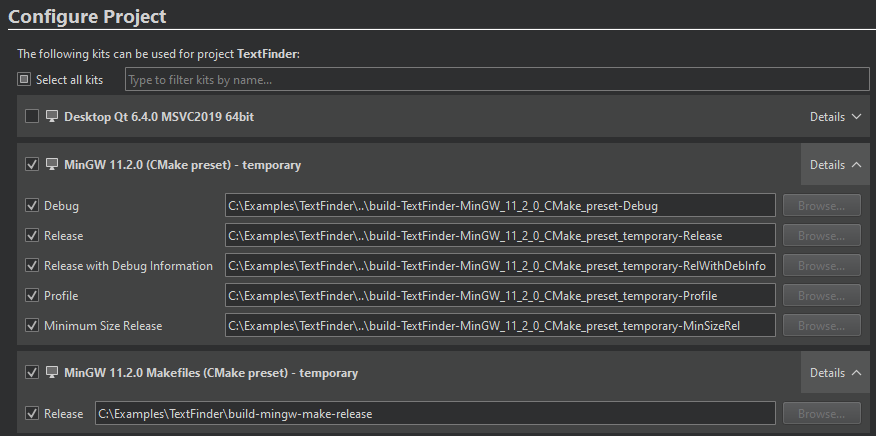
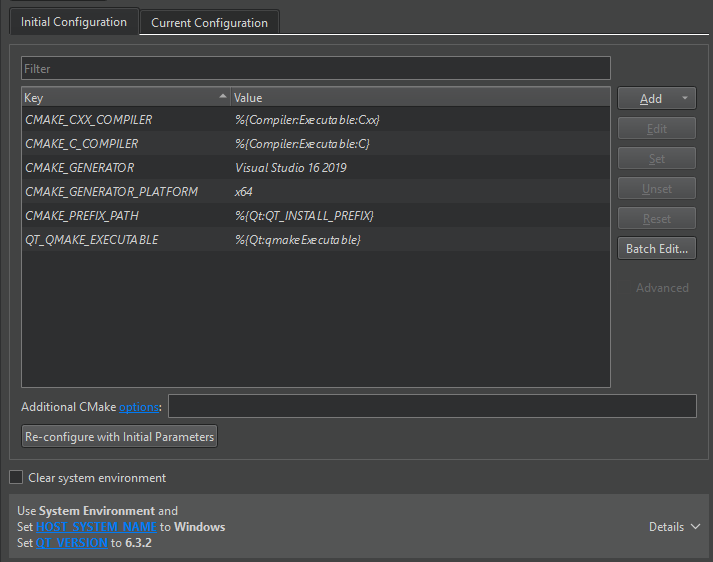
Initial Configuration 필드와 그 아래의 환경 구성 필드에서 사전 설정을 확인할 수 있습니다.
Qt Creator CMakePresets.json 프리셋 파일의 변경 사항을 감시합니다. 파일의 변경 사항을 수동으로 업데이트하려면 로 이동하여 를 선택한 다음, 로드할 프리셋 파일을 선택하십시오. Build Reload CMake Presets
프리셋 구성
다음 사전 설정은 CMake가 플랫폼의 기본 생성기를 사용하도록 지시하고 모든 빌드 유형에 대한 빌드 디렉터리를 지정합니다. NOT_COMMON_VALUE 는 Initial Parameters 에 표시되며, AN_ENVIRONMENT_FLAG 는 환경 구성 필드에 표시됩니다.
{
  "version": 1,
  "configurePresets": [
    {
      "name": "preset",
      "displayName": "preset",
      "binaryDir": "${sourceDir}/build/preset",
      "cacheVariables": {
        "NOT_COMMON_VALUE": "NOT_COMMON_VALUE"
        },
      "environment": {
        "AN_ENVIRONMENT_FLAG": "1"
        }
      },
      "vendor": {
        "qt.io/QtCreator/1.0": {
           "AskBeforePresetsReload": false,
           "AskReConfigureInitialParams": false,
           "AutorunCMake": false,
           "PackageManagerAutoSetup": false,
           "ShowAdvancedOptionsByDefault": true,
           "ShowSourceSubFolders": false,
           "UseJunctionsForSourceAndBuildDirectories": true
           }
      }
  ]
}
vendor 섹션의 CMake 프로젝트 설정에 대한 자세한 내용은 CMake Qt Creator 벤더 사전 설정을 참조하십시오.
MinGW 예제
다음 예제는 다음과 같이 Qt 프로젝트를 구성합니다.
- MinGW 컴파일러
- 빌드 디렉터리 –
<sourceDir>/build-release - 빌드 유형 –
CMAKE_BUILD_TYPERelease - 생성기 – MinGW Makefile
- CMake 실행 파일의 경로
- 다음 경로를 통한 Qt 설치 경로
CMAKE_PREFIX_PATH - MinGW 11.2.0용 GNU gdb 11.2.0 64비트 디버거
{
  "version": 1,
  "configurePresets": [
    {
      "name": "mingw",
      "displayName": "MinGW 11.2.0",
      "generator": "MinGW Makefiles",
      "binaryDir": "${sourceDir}/build-release",
      "cmakeExecutable": "C:/Qt/Tools/CMake_64/bin/cmake.exe",
      "cacheVariables": {
        "CMAKE_BUILD_TYPE": "Release",
        "CMAKE_PREFIX_PATH": "C:/Qt/6.4.0/mingw_64"
      },
      "environment": {
        "PATH": "C:/Qt/Tools/mingw1120_64/bin;$penv{PATH}"
      },
      "vendor": {
        "qt.io/QtCreator/1.0": {
          "debugger": {
            "DisplayName": "GNU gdb 11.2.0 for MinGW 11.2.0 64-bit",
            "Abis": ["x86-windows-msys-pe-64bit"],
            "Binary": "C:/Qt/Tools/mingw1120_64/bin/gdb.exe",
            "EngineType": 1,
            "Version": "11.2.0"
          }
        }
      }
  ]
}
Windows에서 프로세스 속도를 높이려면 cacheVariables 섹션에서 CMAKE_C_COMPILER 및 CMAKE_CXX_COMPILER 를 지정하십시오.
debugger 환경 설정 중 일부의 가능한 값에 대해서는 CMake Qt Creator 벤더 사전 설정을 참조하십시오.
Ninja 생성기 예시
다음 configure 및 빌드 프리셋은 Ninja Multi-Config를 생성기로 설정하고, Debug 및 Release 빌드 단계를 추가하며, CMAKE_MAKE_PROGRAM 변수의 값으로 ninja.exe 경로를 지정합니다:
{
  "version": 2,
  "configurePresets": [
    {
      "name": "ninja-nmc",
      "displayName": "Ninja Multi-Config MinGW",
      "generator": "Ninja Multi-Config",
      "binaryDir": "${sourceDir}/build",
      "cacheVariables": {
        "CMAKE_CONFIGURATION_TYPES": "Debug;Release",
        "CMAKE_PREFIX_PATH": "C:/Qt/6.4.0/mingw_64",
        "CMAKE_MAKE_PROGRAM": "C:/Qt/Tools/Ninja/ninja.exe"
      },
      "environment": {
        "PATH": "c:/Qt/Tools/mingw1120_64/bin;$penv{PATH}"
      }
    }
  ],
  "buildPresets": [
    {
      "name": "release",
      "displayName": "Ninja Release",
      "configurePreset": "ninja-nmc",
      "configuration": "Release"
    },
    {
      "name": "debug",
      "displayName": "Ninja Debug",
      "configurePreset": "ninja-nmc",
      "configuration": "Debug"
    }
  ]
}
이 예제는 CMake 실행 파일 경로가 Preferences > CMake > Tools 에 설정되어 있다고 가정합니다.
MSVC 예제
NMAKE Makefile, Ninja 또는 Ninja Multi-Config 생성기와 함께 MSVC 컴파일러를 사용할 경우, ` architecture ` 및 ` toolset ` 필드에 ` external ` 전략을 사용할 수 있습니다. 이를 통해 ` Qt Creator `는 CMake를 호출하기 전에 Visual C++ 환경을 설정할 수 있습니다.
예를 들어:
"generator": "Ninja Multi-Config",
"toolset": {
  "value": "v142,host=x64",
  "strategy": "external"
},
"architecture": {
  "value": "x64",
  "strategy": "external"
},
VS가 아닌 생성기와 함께 MSVC 컴파일러를 사용하고, ` PATH`에 여러 컴파일러가 설정된 경우, ` cacheVariables ` 또는 ` environmentVariables`에서 사용할 컴파일러를 명시적으로 지정해야 할 수도 있습니다:
"generator": "Ninja Multi-Config",
"toolset": {
  "value": "v142,host=x64",
  "strategy": "external"
},
"architecture": {
  "value": "x64",
  "strategy": "external"
},
"cacheVariables": {
  "CMAKE_C_COMPILER": "cl.exe",
  "CMAKE_CXX_COMPILER": "cl.exe"
}
크로스 컴파일 예제
다음 예제는 macOS에서 Windows용 크로스 컴파일을 수행하고, macOS의 wine 에뮬레이터에서 실행되도록 Qt 프로젝트를 구성하는 것입니다:
- 생성기 – Ninja
- 빌드 디렉터리 –
<sourceDir>/build-release - LLVM/MinGW 툴체인
- 구성 유형 –
CMAKE_BUILD_TYPE(다음과 같이)Release - LLDB 18.1.6 디버거
wine에뮬레이터
{
  "version": 4,
  "configurePresets": [
    {
      "name": "llvm-mingw",
      "displayName": "LLVM-MinGW 18.1.6",
      "generator": "Ninja",
      "binaryDir": "${sourceDir}/build-release",
      "toolchainFile": "llvm-mingw.cmake",
      "cacheVariables": {
        "CMAKE_BUILD_TYPE": "Release",
        "CMAKE_CROSSCOMPILING_EMULATOR": "/opt/homebrew/bin/wine"
      },
      "vendor": {
        "qt.io/QtCreator/1.0": {
          "debugger": {
            "DisplayName": "LLDB 18.1.6 (CMake Preset)",
            "Abis": ["x86-darwin-generic-mach_o-64bit", "arm-darwin-generic-mach_o-64bit"],
            "Binary": "/Users/jdoe/llvm-mingw/bin/lldb",
            "EngineType": 256,
            "Version": "18.1.6"
          }
        }
      }
    }
  ]
}
사용 조건
condition 과 일치하는 경우 다음의 configure 사전 설정이 사용됩니다. 즉, hostSystemName 가 Linux 와 같으면 linux 사전 설정이 사용되고, Windows 와 같으면 windows 사전 설정이 사용됩니다.
{
  "version": 3,
  "configurePresets": [
    {
      "name": "linux",
      "displayName": "Linux GCC",
      "binaryDir": "${sourceDir}/build",
      "cacheVariables": {
        "CMAKE_PREFIX_PATH": "$env{HOME}/Qt/6.4.0/gcc_64"
      },
      "condition": {
        "type": "equals",
        "lhs": "${hostSystemName}",
        "rhs": "Linux"
      }
    },
    {
      "name": "windows",
      "displayName": "Windows MSVC",
      "binaryDir": "${sourceDir}/build",
      "cacheVariables": {
        "CMAKE_PREFIX_PATH": "$env{SYSTEMDRIVE}/Qt/6.4.0/msvc2019_64"
      },
      "condition": {
        "type": "equals",
        "lhs": "${hostSystemName}",
        "rhs": "Windows"
      }
    }
  ]
}
테스트 프리셋
다음 테스트 프리셋은 테스트가 실패할 경우 CMake가 테스트 실행을 중지하고 테스트 프로그램의 출력을 표시하도록 지시하며, 테스트를 찾을 수 없는 경우 오류를 표시하도록 지시합니다.
{
  "version": 3,
  "testPresets": [
  {
    "name": "default",
    "configurePreset": "default",
    "output": {"outputOnFailure": true},
    "execution": {"noTestsAction": "error", "stopOnFailure": true}
    }
  ],
}
참조: 방법: CMake로 빌드하기, CMake로 프로젝트 빌드하기, CMake, CMake Qt Creator 벤더 프리셋, SDK 도구.
Copyright © The Qt Company Ltd. and other contributors. Documentation contributions included herein are the copyrights of their respective owners. The documentation provided herein is licensed under the terms of the GNU Free Documentation License version 1.3 as published by the Free Software Foundation. Qt and respective logos are trademarks of The Qt Company Ltd in Finland and/or other countries worldwide. All other trademarks are property of their respective owners.
