
여러 커서 삽입
Edit 모드에서 편집기의 여러 위치에 동시에 변경 사항을 적용하려면 Alt 키를 누른 상태에서 파일 내 여러 위치에 커서를 배치하도록 클릭합니다. 수행한 모든 변경 사항은 모든 커서 위치에 동시에 적용됩니다.
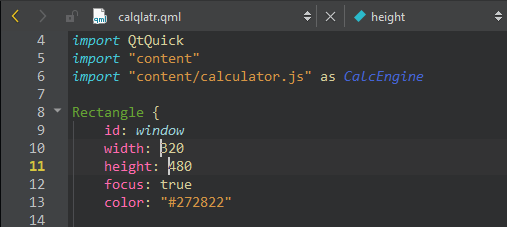
커서를 관리하려면:
- 화살표 키를 사용하여 모든 커서를 위아래로 이동합니다.
- Home 및 End 키를 사용하여 모든 커서를 줄의 시작 또는 끝으로 이동합니다.
- Alt 키를 누른 상태에서 문자열을 두 번 클릭하면 여러 문자열을 동시에 선택할 수 있습니다.
- Alt+Shift+I를 누르면 선택된 줄의 끝에 커서가 생성됩니다.
- Esc 키를 누르면 모든 커서와 선택 영역이 해제됩니다.
'방법: 코드 편집', '선택한 줄 편집' 및 '코드 편집'도 참조하십시오 .
Copyright © The Qt Company Ltd. and other contributors. Documentation contributions included herein are the copyrights of their respective owners. The documentation provided herein is licensed under the terms of the GNU Free Documentation License version 1.3 as published by the Free Software Foundation. Qt and respective logos are trademarks of The Qt Company Ltd in Finland and/or other countries worldwide. All other trademarks are property of their respective owners.
