
일반 하이라이터
Qt Creator 는 Python이나 셸 스크립트 파일과 같이 전용 지원이 없는 파일의 코드를 강조 표시하기 위해 Kate 구문 정의를 적용한 KSyntaxHighlighting 엔진을 사용합니다. 이 엔진이 사용하는 강조 표시 정의를 관리하려면 ‘ Preferences ’ > ‘ Text Editor ’ > ‘ Generic Highlighter ’를 선택하십시오.
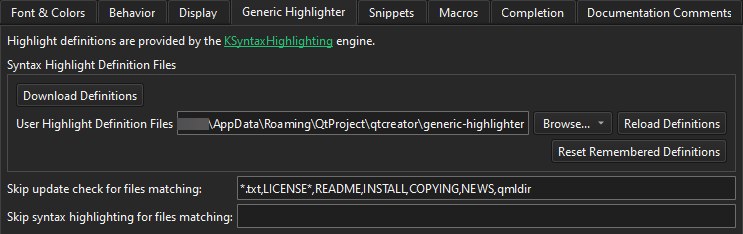
다음 표에는 설정할 수 있는 환경 설정 항목이 설명되어 있습니다.
| 환경 설정 | 설명 |
|---|---|
| Download Definitions | 누락된 구문 정의 파일을 다운로드하고 기존 파일을 업데이트합니다. |
| User Highlight Definition Files | Qt Creator 가 다운로드된 정의 파일 외에도 사용자 정의 하이라이트 정의 파일을 검색할 폴더를 설정합니다. |
| Reload Definitions | Qt Creator 외부에서 수정된 정의 파일을 다시 불러옵니다. |
| Reset Remembered Definitions | 하나 이상의 정의와 연관될 수 있는 파일에 대해 Qt Creator 가 기억하고 있는 강조 표시 정의를 재설정합니다. “강조 표시 정의 다운로드”를 참조하십시오. |
| Skip update check for files matching | Qt Creator 가 누락된 강조 표시 정의를 다운로드하라고 요청하지 않도록 할 와일드카드가 포함된 파일 패턴을 쉼표로 구분하여 나열합니다. |
| Skip syntax highlighting for files matching | Qt Creator 가 일반적인 구문 강조를 전혀 적용하지 않는 와일드카드 지원 파일 패턴을 쉼표로 구분하여 나열합니다. |
‘사용 방법: 편집기 구성’, ‘편집기 구성’ 및 ‘하이라이트 정의 다운로드’항목도 참조하십시오 .
Copyright © The Qt Company Ltd. and other contributors. Documentation contributions included herein are the copyrights of their respective owners. The documentation provided herein is licensed under the terms of the GNU Free Documentation License version 1.3 as published by the Free Software Foundation. Qt and respective logos are trademarks of The Qt Company Ltd in Finland and/or other countries worldwide. All other trademarks are property of their respective owners.
