
IncrediBuild 构建配置
要为所选套件指定构建设置,请转至“Projects ” > “Build Settings ”。
您可以为 IncrediBuild 指定构建步骤和清理步骤。
IncrediBuild 构建步骤
要使用 IncrediBuild,请选择“Add Build Step ” > “IncrediBuild for Linux ”或“IncrediBuild for Windows ”。
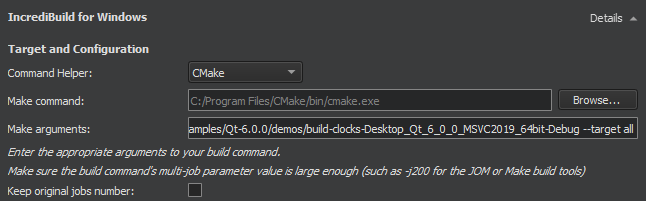
IncrediBuild 会通过遍历您已定义的构建步骤来自动检测构建步骤。初始构建步骤设置将成为您 IncrediBuild 构建步骤的一部分,因此您仍将使用惯用的构建工具,同时还能享受 IncrediBuild 带来的构建加速和图形化构建监视器等额外优势。
在“Target and configuration ”组中,请指定用于构建构建命令的命令助手和参数。
构建错误和警告会被解析并显示在“问题”中。
选择“Keep original jobs number ”可阻止 IncrediBuild 覆盖 `-j ` 命令行开关,该开关控制由Qt Creator 执行的构建工具以并行方式运行的进程数量。IncrediBuild 设定的默认值为 200。
需要指定的分布控制设置取决于您使用的是 Linux 还是 Windows。
Linux 上的分布控制设置

对于 Linux 构建,您可以指定以下设置:
- Nice value 是一个介于 -20 到 19 之间的数值
- Force remote 强制将
allow_remote任务分配给远程Helpers。 - Alternate tasks preference
Windows 上的分发控制设置
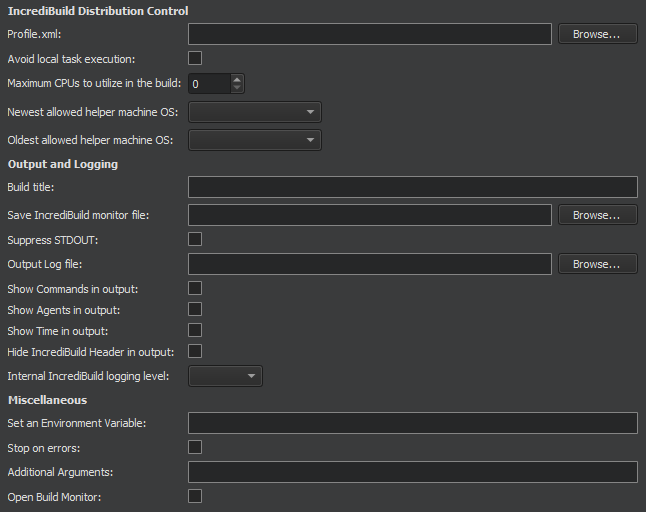
您可以为 Windows 构建指定以下设置:
| 设置 | 值 |
|---|---|
| Profile.xml | 定义“自动拦截接口”如何处理分布式作业中的进程。对于 Visual Studio 或 Make and Build 工具的构建而言,此设置并非必需;但如果这些构建使用了未包含在上述软件包中的进程,则可用于添加配置选项。在 Dev Tools 构建中,必须配置可分布的进程。 |
| Avoid local task execution | 释放发起机上的资源。如果发起机因 CPU 使用率过高而成为构建的瓶颈,此设置可能有助于分布式构建。 |
| Maximum CPUs to utilize in the build | 指定构建中可使用的最大远程核心数。该设置将覆盖相应的全局设置。 |
| Newest allowed helper machine OS Oldest allowed helper machine OS | 指定辅助机上已安装的最新和最旧操作系统,以允许其作为辅助机参与构建。 |
| Build title | 指定将在构建输出文本开头显示的自定义标题行。该标题也将用于“构建历史记录”和“构建监视器”的显示。 |
| Save IncrediBuild monitor file | 将构建进度文件(.ib_mon )的副本写入指定位置。如果仅提供文件夹名称,IncrediBuild 会为文件名生成一个 GUID。构建输出末尾会添加一条包含已保存.ib_mon 文件位置的消息。 |
| Suppress STDOUT | 不向标准输出写入任何内容。 |
| Output Log file | 将构建输出写入文件。 |
| Show Commands in output | 显示 IncrediBuild 用于构建该文件的命令行。 |
| Show Agents in output | 显示用于构建每个文件的代理。 |
| Show Time in output | 显示每个已构建文件的开始和结束时间。 |
| Hide IncrediBuild Header in output | 在构建输出中隐藏 IncrediBuild 标题。 |
| Internal IncrediBuild logging level | 覆盖本次构建的 IncrediBuild 内部日志级别。不会影响输出或任何用户可访问的日志。主要用于在 IncrediBuild 支持团队的协助下排查问题。 |
| Set an Environment Variable | 为构建上下文设置或覆盖环境变量。 |
| Stop on errors | 一旦遇到错误,立即停止执行。这是 Visual Studio 构建中的默认行为,但不适用于 Make 和 Build 工具或 Dev Tools 构建。 |
| Additional Arguments | 将这些参数拼接到最终的构建控制台命令行中。 |
| Open Build Monitor | 打开 IncrediBuild 构建监视器,在构建开始后以图形方式显示构建进度。 |
IncrediBuild 清理步骤
使用 IncrediBuild 进行构建时,您可以在Clean Steps 中为 clean 命令添加参数和目标。
构建错误和警告会被解析并显示在“问题”中。
另请参阅 “为项目激活套件”、“添加清理步骤”、“配置项目以进行构建”、“配置项目以进行运行”、“打开项目”、“构建和运行项目”以及“IncrediBuild”。
Copyright © The Qt Company Ltd. and other contributors. Documentation contributions included herein are the copyrights of their respective owners. The documentation provided herein is licensed under the terms of the GNU Free Documentation License version 1.3 as published by the Free Software Foundation. Qt and respective logos are trademarks of The Qt Company Ltd in Finland and/or other countries worldwide. All other trademarks are property of their respective owners.
