
Meson 构建配置
要为所选套件指定构建设置,请转至“Projects ” > “Build Settings ”。
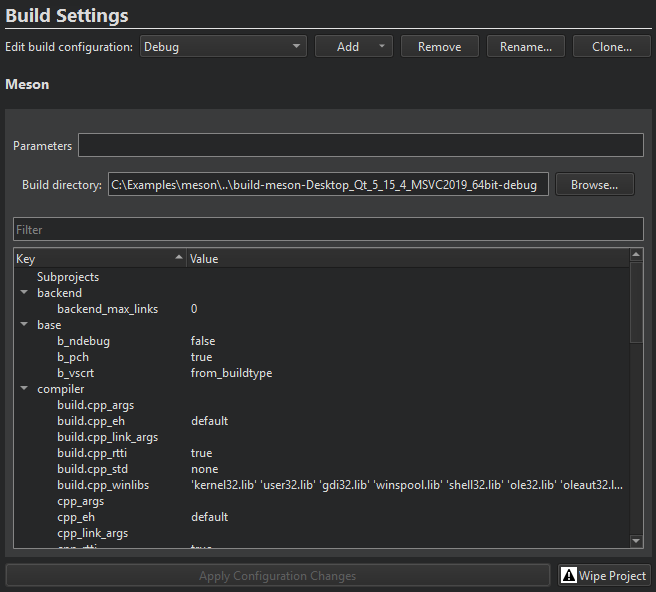
Meson 会在“Build directory ”字段中指定的目录中构建项目。
构建设置按类别分组。您可以修改所有设置,但“backend ”除外,该设置被强制设为“Ninja”、“buildtype ”、“debug ”和“optimization ”,以确保与Qt Creator 的兼容性。
要修改某项设置,请双击该项。修改后的设置会以粗体显示,直到您选择“Apply configuration changes ”以应用这些设置。这将触发“meson configure ”。如果出现问题,请选择“Wipe Project ”以修复构建目录配置。
除了原生构建外,Meson 还支持交叉编译。Qt Creator 会为您生成一个原生构建文件。若要改用自定义原生文件或交叉文件,请在Parameters 中指定文件名。例如:--cross-file cross_file.txt 。
Meson 构建步骤
Qt Creator 通过运行meson compile --verbose target 来构建 Meson 项目。
您可以在Build Steps 中为构建命令添加参数和目标。
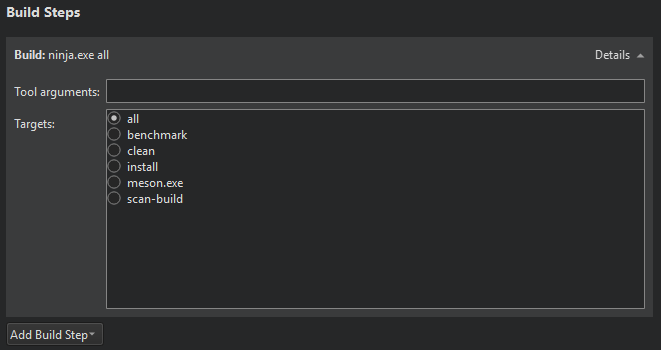
构建错误和警告会被解析并显示在“问题”中。
Meson 清理步骤
使用 Meson 构建时,您可以在Clean Steps 中为 clean 命令添加参数和目标。
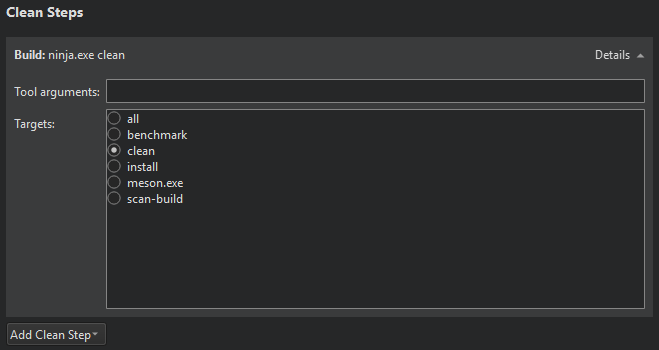
构建错误和警告将被解析并显示在“Issues ”中。
另请参阅 “为项目激活套件”、“配置项目以进行构建”、“配置项目以进行运行”、“打开项目”、“构建和运行项目”以及“Meson”。
Copyright © The Qt Company Ltd. and other contributors. Documentation contributions included herein are the copyrights of their respective owners. The documentation provided herein is licensed under the terms of the GNU Free Documentation License version 1.3 as published by the Free Software Foundation. Qt and respective logos are trademarks of The Qt Company Ltd in Finland and/or other countries worldwide. All other trademarks are property of their respective owners.
