
指定代码样式
文件的 MIME 类型决定了文件将以何种模式和编辑器打开。Qt Creator 会在 C++ 代码编辑器中以“Edit ”模式打开 C++ 文件,并在Qt Quick 编辑器中打开 QML 文件。
为以下内容指定缩进:
- C++ 文件
- QML 文件
- Nim 文件
可全局设置代码样式,或针对每个项目单独设置。您可以指定多套代码样式设置,并轻松在它们之间切换。此外,您还可以导入和导出代码样式设置。
若要覆盖当前项目的全局代码样式:
- 转到“Projects ” > “Project Settings ” > “Code Style ”。
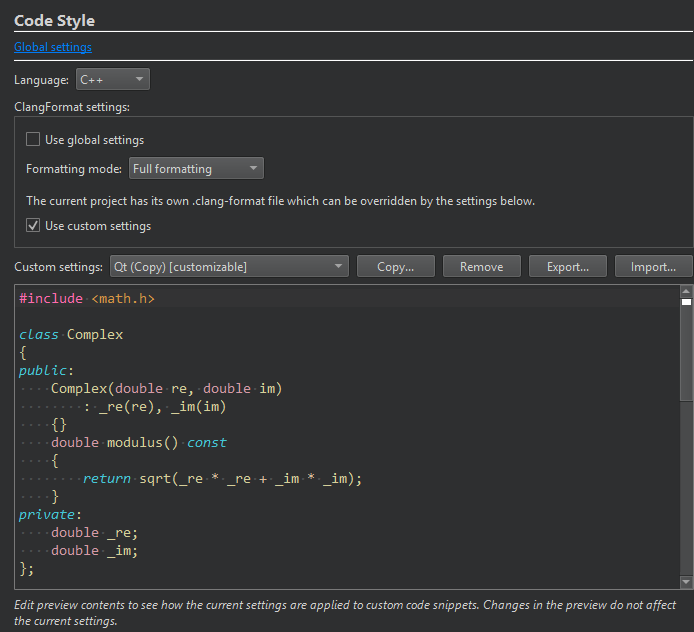
- 在“Language ”中,选择“C++ ”, Qt Quick或“Nim ”。
- 对于 C++,请取消选中“Use global settings ”,以便为该项目使用“
.clang-format”文件。 - 若要覆盖项目的“
.clang-format”文件,请选择“Use custom settings ”。 - 在“Custom settings ”中,选择要用于该项目的设置。
在极少数情况下,ClangFormat可能会因某种代码结构而出现问题,导致Qt Creator 崩溃。如果您的项目发生这种情况,请在“Formatting mode ”中选择“Use Built-In Indenter ”,以禁用该项目的 ClangFormat。如果您能重现该崩溃,请访问Help >Report Bug 提交错误报告,并在报告中附上触发崩溃的代码。
另请参阅 “缩进文本或代码”、“编辑 MIME 类型”、“C++ 代码样式”、“指定Qt Quick 代码样式”以及“Nim”。
Copyright © The Qt Company Ltd. and other contributors. Documentation contributions included herein are the copyrights of their respective owners. The documentation provided herein is licensed under the terms of the GNU Free Documentation License version 1.3 as published by the Free Software Foundation. Qt and respective logos are trademarks of The Qt Company Ltd in Finland and/or other countries worldwide. All other trademarks are property of their respective owners.
