
代码补全
在编写代码时,Qt Creator 会根据属性、ID 和代码片段提供建议,以帮助您完成代码。它会针对光标当前所在的语句显示一组建议列表。
按Tab键或Enter键即可采纳所选建议并完成代码。
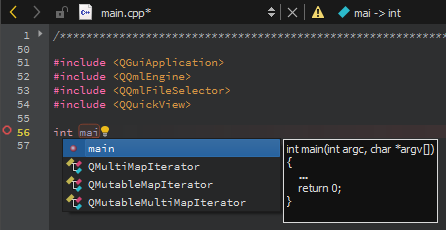
用于补全 C++ 代码的建议。
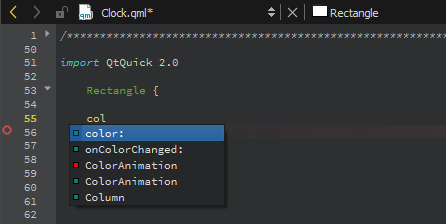
用于补全 QML 代码的建议。
如需随时打开建议列表,请按Ctrl+Space。如果只有一个选项可用,Qt Creator 会自动插入该选项。
可用类型的摘要
下表列出了代码补全中可用的类型以及各自对应的图标。
| 图标 | 描述 |
|---|---|
 | 类 |
 | 枚举 |
 | 枚举项(枚举的值) |
 | 一个函数 |
 | 私有函数 |
 | 受保护函数 |
 | 一个变量 |
 | 一个私有变量 |
 | 一个受保护的变量 |
 | 一个信号 |
 | 一个槽 |
 | 一个私有插槽 |
 | 受保护的插槽 |
 | 一个 C++ 关键字 |
 | 一段 C++ 代码 |
 | 一个 QML 类型 |
 | 一个 QML 代码片段 |
 | 一个宏 |
 | 一个命名空间 |
完整的代码片段
代码片段可能包含多个需要您指定值的变量。在列表中选择一个项目,然后按Tab或Enter 键即可完成代码。按Tab 键可在变量之间切换并为其指定值。当您为某个变量指定值时,片段中该变量的所有实例都会被重命名。
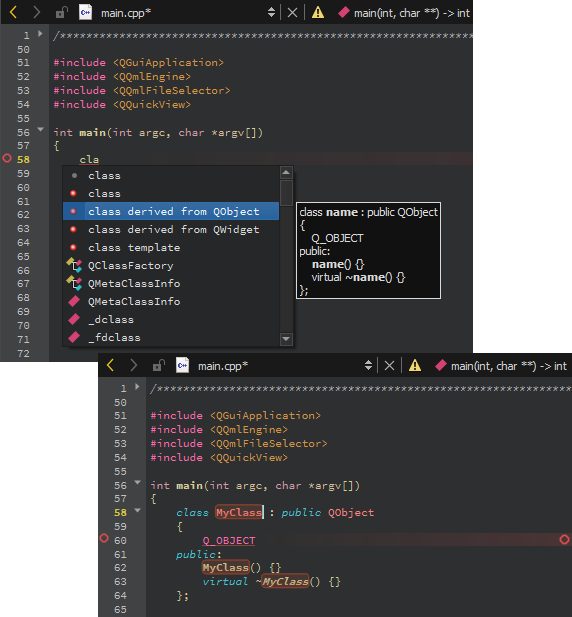
C++ 代码片段。
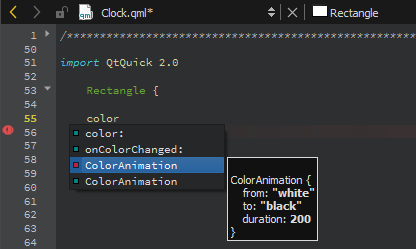
QML 代码片段。
另请参阅 “将代码片段添加到自动完成菜单”、“完成 CMake 代码”、“自动完成”、“Nim”和“代码片段”。
Copyright © The Qt Company Ltd. and other contributors. Documentation contributions included herein are the copyrights of their respective owners. The documentation provided herein is licensed under the terms of the GNU Free Documentation License version 1.3 as published by the Free Software Foundation. Qt and respective logos are trademarks of The Qt Company Ltd in Finland and/or other countries worldwide. All other trademarks are property of their respective owners.
