
将代码片段添加到自动完成菜单
要在代码片段编辑器中添加代码或文本片段:
- 选择“Preferences ” > “Text Editor ” > “Snippets ”。
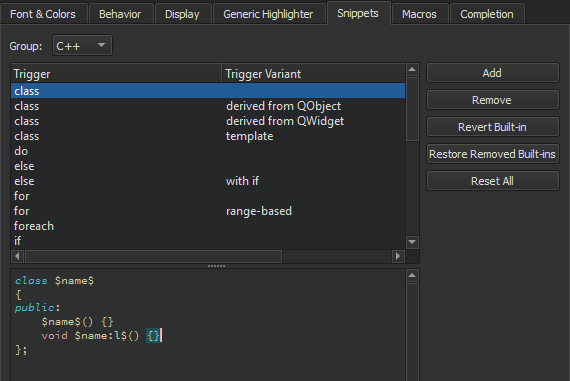
- 在“Group ”中,选择要添加的代码片段类型。
- 选择“Add ”。
- 指定一个触发条件。如果该触发条件已被使用,可添加一个可选变体。当您编写代码时,这些内容会出现在建议列表中。此外,请根据代码片段的类别,在代码片段编辑器中指定一个文本字符串或 C++ 及 QML 代码结构。
您可以在代码片段中使用预定义变量。
另请参阅 “补全 CMake 代码”、“补全代码”、“使用Qt Creator 变量”、“代码补全”、“Nim”和“代码片段”。
Copyright © The Qt Company Ltd. and other contributors. Documentation contributions included herein are the copyrights of their respective owners. The documentation provided herein is licensed under the terms of the GNU Free Documentation License version 1.3 as published by the Free Software Foundation. Qt and respective logos are trademarks of The Qt Company Ltd in Finland and/or other countries worldwide. All other trademarks are property of their respective owners.
