
代码补全
要设置代码补全的首选项,请选择“Preferences ” > “Text Editor ” > “Completion ”。
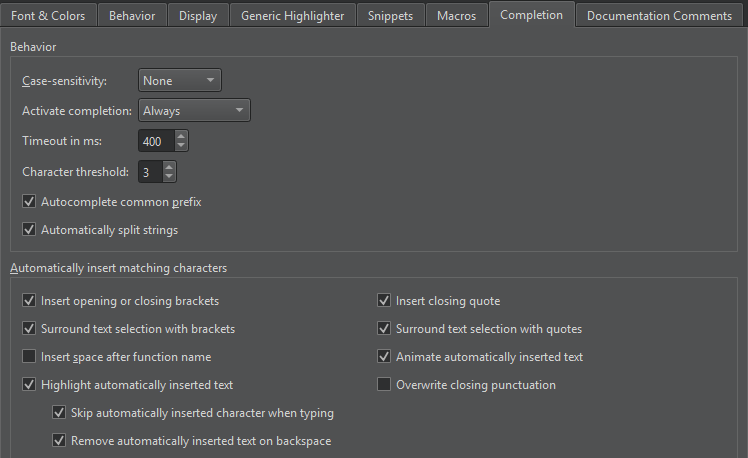
代码补全行为
默认情况下,代码补全不区分大小写。若要应用完全区分大小写或首字母区分大小写,请在“Case-sensitivity ”字段中选择“Full ”或“First Letter ”。
默认情况下,代码补全功能始终会被调用,但您可以在Activate completion 字段中更改此行为,将其设置为Manually 或When Triggered 。
您可以在“Timeout in ms ”字段中以毫秒为单位设置代码补全的超时时间。
在“Character threshold ”字段中,指定需要输入多少个字符才能触发代码补全。
当手动调用补全功能时,“Qt Creator ”会补全建议列表中的通用前缀。对于包含多个名称相似的成员的类,此功能尤为有用。若要禁用此功能,请取消选中“Autocomplete common prefix ”。
选择“Automatically split strings ”可将字符串拆分为两行:当按下Enter 键时,在光标位置添加一个结束引号;并在下一行的开头(字符串剩余部分之前)添加一个开始引号。此外,按下Shift+Enter可在光标位置插入一个转义字符,并将字符串的剩余部分移至下一行。
自动插入匹配字符
当您选中代码并输入括号或引号时,系统会自动在选定范围的末尾添加相应的闭合符号。
默认情况下,自动插入的文本会高亮显示并带有动画效果,在输入时会被跳过,并在按下退格键时被删除。
另请参阅 :如何:配置编辑器、补全 CMake 代码、补全代码、将代码用括号或引号括起,以及Nim。
Copyright © The Qt Company Ltd. and other contributors. Documentation contributions included herein are the copyrights of their respective owners. The documentation provided herein is licensed under the terms of the GNU Free Documentation License version 1.3 as published by the Free Software Foundation. Qt and respective logos are trademarks of The Qt Company Ltd in Finland and/or other countries worldwide. All other trademarks are property of their respective owners.
