
添加Bare Metal 设备
在不受远程 Linux 设备插件支持的小型设备上,使用 GDB 或硬件调试器运行和调试应用程序。
要添加裸机设备:
- 转至“Preferences ” > “Devices ” > “Devices ”。
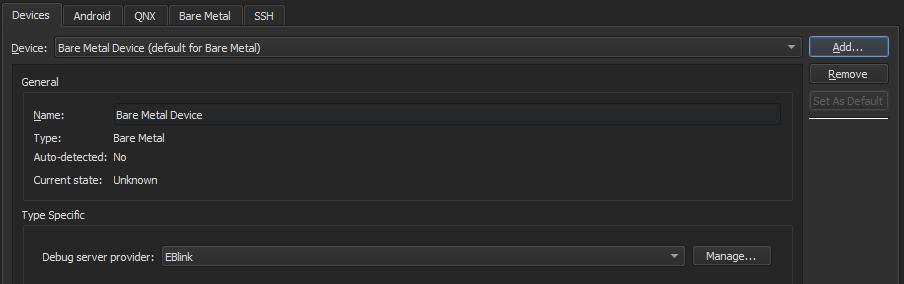
- 选择“Add ” > Bare Metal Device >Start Wizard 。
- 在“Debug server provider ”中,选择一个调试服务器提供商。
- 选择“Finish ”返回 > “Devices ”。
- 选择“Apply ”以添加该设备。
将设备添加到开发套件
要添加用于构建应用程序并在裸机设备上运行应用程序的套件,请转到Preferences >Kits ,然后选择“Add ”。
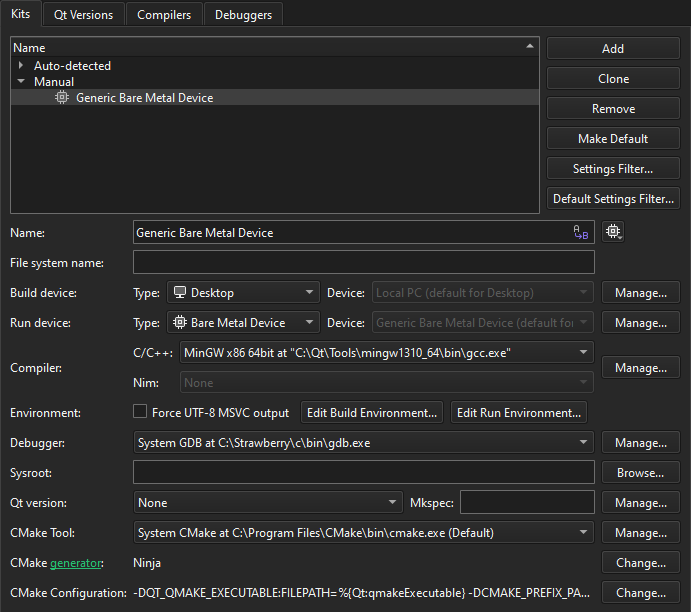
为裸机设备构建应用程序并在其上运行,其方法与在桌面设备上相同。
另请参阅 “添加开发套件”、“针对多种平台构建”、“如何:为Bare Metal 开发”、“运行应用程序”以及“为Bare Metal 设备开发”。
Copyright © The Qt Company Ltd. and other contributors. Documentation contributions included herein are the copyrights of their respective owners. The documentation provided herein is licensed under the terms of the GNU Free Documentation License version 1.3 as published by the Free Software Foundation. Qt and respective logos are trademarks of The Qt Company Ltd in Finland and/or other countries worldwide. All other trademarks are property of their respective owners.
