
添加 CMake 工具
Qt Creator 会自动检测您在PATH 中指定的CMake可执行文件。您可以添加其他CMake可执行文件的路径,并在不同的构建和运行套件中使用它们。
要查看Qt Creator 自动检测到的CMake安装:
- 选择“Preferences ” > “CMake ” > “Tools ”。
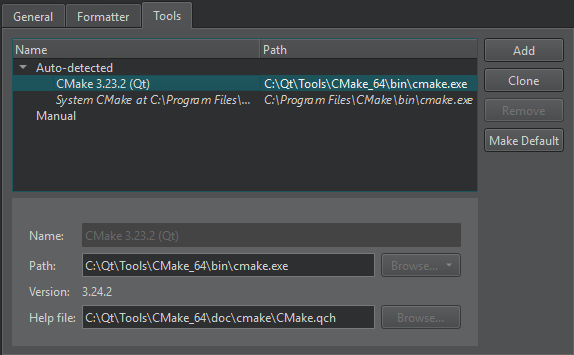
- “Name ”字段会显示该 CMake 安装的名称。
- “Path ”字段显示 CMake 可执行文件的路径。
- “Help file ”字段显示随 CMake 附带的 CMake 帮助文件(.qch)的路径。
要刷新自动检测到的 CMake 可执行文件列表,请选择“Re-detect ”。
添加或移除 CMake 工具
若要添加“Qt Creator ”无法自动检测到的 CMake 可执行文件路径并为其指定设置,请选择“Add ”。
若要在远程 Linux 设备或 Docker 中添加 CMake 可执行文件,请在“Browse ”(macOS 系统中为“Choose ”)的“Path ”字段中,从下拉菜单中选择“Remote ”。
若要修改自动检测到的安装,请选择“Clone ”。
要从列表中删除所选的 CMake 可执行文件,请选择“Remove ”。
设置默认 CMake 工具
Qt Creator 如果系统没有足够的信息来选择要使用的 CMake,则会使用默认的 CMake。若要将选定的 CMake 可执行文件设为默认值,请选择“Make Default ”。
将 CMake 工具添加到构建套件
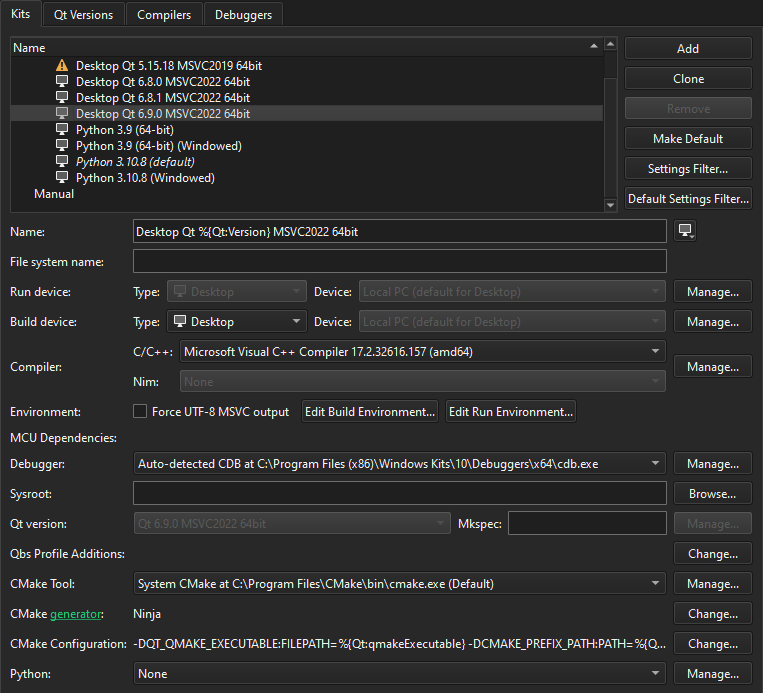
要将 CMake 工具添加到构建和运行套件中,请选择“Preferences ”>“Kits ”。该套件还会指定用于生成Qt Creator 项目文件的 CMake 生成器以及初始配置参数:
另请参阅 《在远程 Linux 设备上构建应用程序》、《在 Docker 设备上构建》、《操作指南:使用 CMake 构建》、《操作指南:管理套件》、《CMake》以及《管理套件》。
Copyright © The Qt Company Ltd. and other contributors. Documentation contributions included herein are the copyrights of their respective owners. The documentation provided herein is licensed under the terms of the GNU Free Documentation License version 1.3 as published by the Free Software Foundation. Qt and respective logos are trademarks of The Qt Company Ltd in Finland and/or other countries worldwide. All other trademarks are property of their respective owners.
