
在 Docker 设备上构建
除了为Docker 构建应用程序外,您还可以使用 Docker 中的工具链在Docker中构建应用程序。
注意:需启用 Docker 插件才能使用该功能。
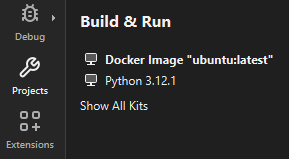
“构建与运行”中的 Docker 设备套件
要在 Docker 设备上构建应用程序:
- 访问Preferences >Devices >Devices ,然后选择“Add ”以添加一个 Docker 设备。
- 访问Preferences >CMake >Tools ,然后选择Add 。
- 在Path 中,于Browse (macOS 系统中为Choose )的下拉菜单中选择Remote ,以添加 Docker 设备上 CMake 可执行文件的路径。
- 转到Preferences >Kits >Qt Versions ,然后按住Shift 键并点击Add 按钮,以添加 Docker 设备上的 Qt 版本。
- 转到Preferences >Kits >Compilers ,然后在“Add ”中选择编译器类型。
- 在C compiler path 中,于Browse (macOS 系统中为Choose )的下拉菜单中选择Remote ,以在 Docker 设备上添加编译器的路径。
- 转至Preferences >Kits ,以添加用于在该设备上进行构建的构建套件。
- 选择您在上一步中添加的设备、CMake 工具、Qt 版本和编译器。
- 在Type 的Run device 和Build device 中,选择Docker device 。在Device 中,选择要实际运行和构建的设备。
- 要指定构建设置:
- 打开要为该设备开发的应用程序项目。
- 选择“Projects ” > “Build & Run ”以激活您在上一步中指定的开发套件。
- 转到“Run Settings ”以指定运行设置。通常,您可以使用默认设置。
- 运行项目时,Qt Creator 会根据“Deploy Settings ”中的设置部署应用程序。
另请参阅 “添加 CMake 工具”、“启用和禁用插件”、“如何:针对 Docker 进行开发”、“如何:管理套件”以及“针对 Docker 进行开发”。
Copyright © The Qt Company Ltd. and other contributors. Documentation contributions included herein are the copyrights of their respective owners. The documentation provided herein is licensed under the terms of the GNU Free Documentation License version 1.3 as published by the Free Software Foundation. Qt and respective logos are trademarks of The Qt Company Ltd in Finland and/or other countries worldwide. All other trademarks are property of their respective owners.
