
将调试器连接到正在启动的进程
要指示调试器监视某个应用程序进程,并在该进程启动时连接到它:
- 转到“Debug ” > “Start Debugging ” > “Attach to Unstarted Application ”。
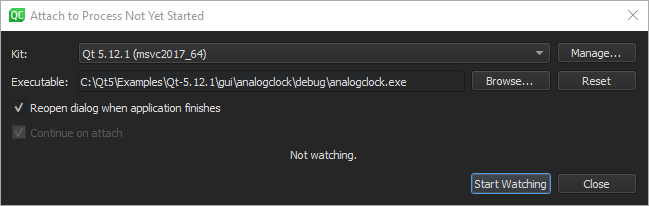
- 在“Kit ”中,选择用于构建该项目的构建和运行套件。
- 在“Executable ”中,指定应用程序可执行文件的路径。
- 选择“Reopen dialog when application finishes ”以在应用程序关闭时返回此对话框。
- 选择“Continue on attach ”可指示调试器在附加到应用程序后保持应用程序继续运行。
- 选择“Start Watching ”以等待应用程序进程启动。
Copyright © The Qt Company Ltd. and other contributors. Documentation contributions included herein are the copyrights of their respective owners. The documentation provided herein is licensed under the terms of the GNU Free Documentation License version 1.3 as published by the Free Software Foundation. Qt and respective logos are trademarks of The Qt Company Ltd in Finland and/or other countries worldwide. All other trademarks are property of their respective owners.
