
在 VxWorks 设备上调试 C++ 应用程序
注意:请将 所有库依赖项放置 在 SD 卡上。从其他位置(例如已挂载的 NFS 目录)无法进行调试。
Qt Creator 该操作仅将应用程序二进制文件和其他可部署文件复制到 SD 卡的根目录,不会保留或创建 SD 卡上的目录结构。
要调试 Qt 应用程序,请在 VxWorks 源代码构建 (VSB) 配置中添加以下行:
vxprj vsb config -s -add "_WRS_CONFIG_TCF_GDB_RSP=y"
若要在设备上自动启动 GDB 服务器,请在 VxWorks 映像项目(VIP)配置中添加以下行:
"INCLUDE_DEBUG_AGENT"
"INCLUDE_DEBUG_AGENT_START"
"INCLUDE_STANDALONE_SYM_TBL"
有关更多信息,请参阅《Qt for VxWorks》。
设置调试:
- 为该项目激活一个 VxWorks 开发套件。
- 转至“Projects ” > “Run Settings ”。
- 设置 `Priority ` 和 `Stack size`。
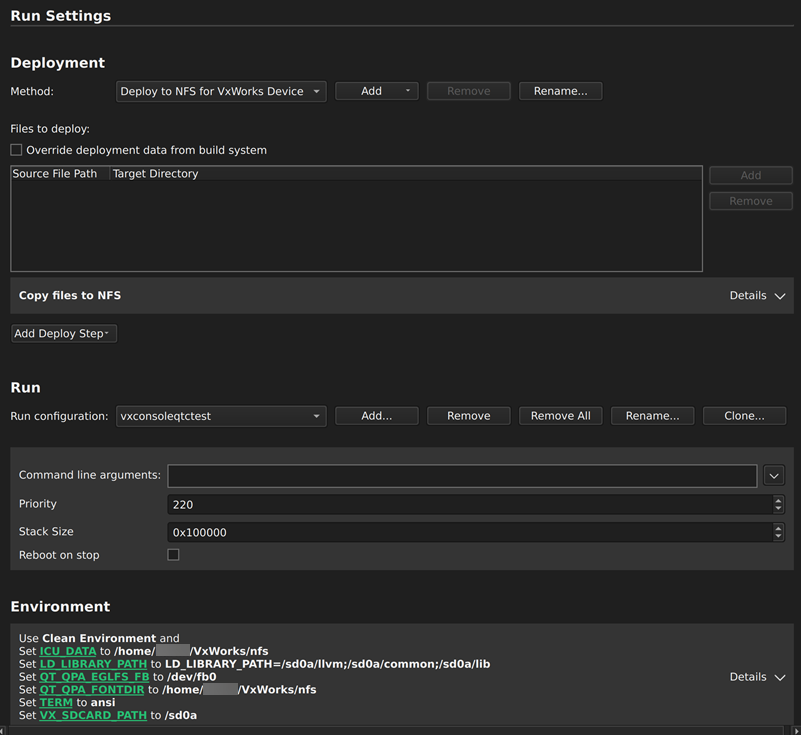
- 在“Environment ”中,将“
LD_LIBRARY_PATH”变量设置为 SD 卡上库文件的位置。如果 SD 卡的路径不是/sd0a,请将“VX_SDCARD_PATH”设置为正确的位置。
要开始调试,请按F5 键,或转至“Debug ” > “Start Debugging ” > “Start Debugging of Startup Project ”。
另请参阅 “为项目激活开发套件”、“启用和禁用插件”、“操作指南:VxWorks”、“调试”、“VxWorks 开发”以及“Qt for VxWorks”。
Copyright © The Qt Company Ltd. and other contributors. Documentation contributions included herein are the copyrights of their respective owners. The documentation provided herein is licensed under the terms of the GNU Free Documentation License version 1.3 as published by the Free Software Foundation. Qt and respective logos are trademarks of The Qt Company Ltd in Finland and/or other countries worldwide. All other trademarks are property of their respective owners.
