
为 Docker 设备构建并在其上运行
注意:需启用 Docker 插件才能使用该功能。
要指定 Docker 镜像的构建设置:
- 打开要为该设备开发的应用程序的项目。
- 转至“Projects ” > “Build & Run ”,并启用 Docker 设备的开发套件。
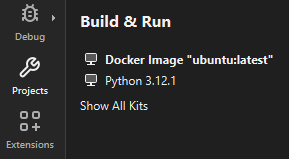
“构建与运行”中的 Docker 设备套件
转至Run Settings 以指定运行设置。通常情况下,您可以使用默认设置。
另请参阅 “启用和禁用插件”、“如何:针对 Docker 进行开发”、 “如何:管理套件”以及“针对 Docker 进行开发”。
Copyright © The Qt Company Ltd. and other contributors. Documentation contributions included herein are the copyrights of their respective owners. The documentation provided herein is licensed under the terms of the GNU Free Documentation License version 1.3 as published by the Free Software Foundation. Qt and respective logos are trademarks of The Qt Company Ltd in Finland and/or other countries worldwide. All other trademarks are property of their respective owners.
