
创建 vcpkg 清单文件
要创建新的vcpkg包管理器清单文件(vcpkg.json ):
- 选择“File ” > “New File ” > “vcpkg ” > “vcpkg.json Manifest File ” > “Choose ”,以打开“Location ”对话框。
- 在“File name ”中,输入清单文件的名称。
- 在“Path ”中,输入清单文件的路径。
- 选择“Next ”,以打开“vcpkg.json Manifest File ”对话框。
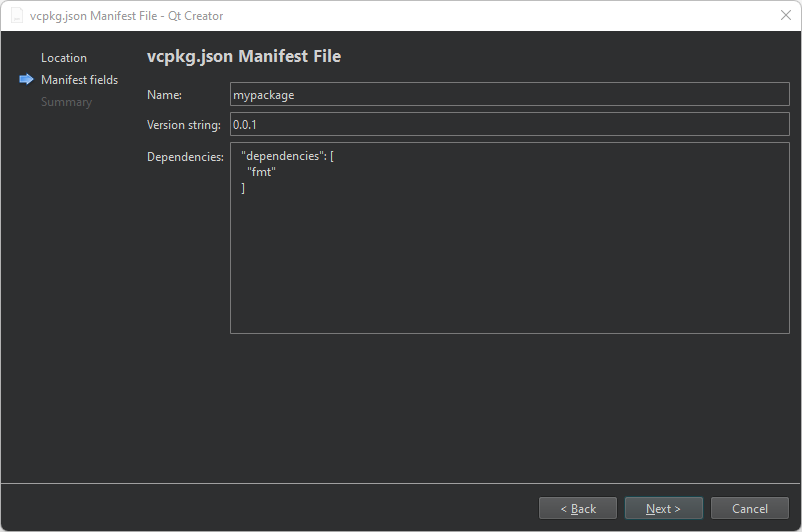
- 在“Name ”中,输入清单文件的名称。
- 在“Version string ”中,输入文件的版本号。
- 在“Dependencies ”中,输入要管理的软件包。
您稍后还可以在清单编辑器中添加软件包。
- 选择“Next ”以打开“Project Management ”页面。
- 选择“Finish ”以创建该文件。
向导会自动将vcpkg.json 文件添加到项目的CMakeLists.txt 文件中。
另请参阅 “设置 vcpkg 包管理器”和“编辑 vcpkg 清单文件”。
Copyright © The Qt Company Ltd. and other contributors. Documentation contributions included herein are the copyrights of their respective owners. The documentation provided herein is licensed under the terms of the GNU Free Documentation License version 1.3 as published by the Free Software Foundation. Qt and respective logos are trademarks of The Qt Company Ltd in Finland and/or other countries worldwide. All other trademarks are property of their respective owners.
