
设置 vcpkg 包管理器
实验性的 vcpkg 插件集成了vcpkgC/C++ 包管理器。该插件在所有受支持的开发平台上均可使用。
当使用 CMake 作为构建系统时,可通过创建和编辑 `vcpkg.json ` 文件来指定作为项目组成部分进行构建的软件包。
注意:需启用 vcpkg 插件才能使用。
设置 vcpkg
要在命令行中配置 vcpkg,请输入:
$ git clone https://github.com/microsoft/vcpkg
$ cd vcpkg

$ ./bootstrap-vcpkg.sh
设置 vcpkg 的路径
若要将Path 设置为 vcpkg 的安装目录,请选择“Preferences ”>“CMake ”>“Vcpkg ”。
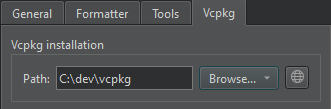
若尚未安装 vcpkg,请选择“ ”以下载 vcpkg。
关闭自动配置
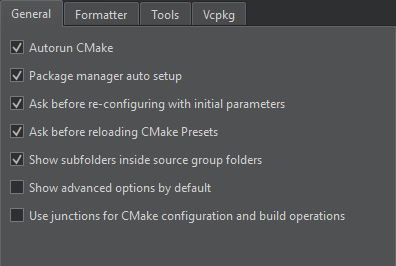
默认情况下,vcpkg 会自动配置为与 CMake 配合使用。要关闭自动配置,请选择Preferences >CMake >General >Package manager auto setup 。
另请参阅 “创建 vcpkg 清单文件”、“编辑 vcpkg 清单文件”、“启用和禁用插件”、“支持的平台”以及“vcpkg”。
Copyright © The Qt Company Ltd. and other contributors. Documentation contributions included herein are the copyrights of their respective owners. The documentation provided herein is licensed under the terms of the GNU Free Documentation License version 1.3 as published by the Free Software Foundation. Qt and respective logos are trademarks of The Qt Company Ltd in Finland and/or other countries worldwide. All other trademarks are property of their respective owners.
