
编辑 vcpkg 清单文件
当您打开vcpkg.json 文件时,系统会将其在vcpkg清单文件编辑器中打开:
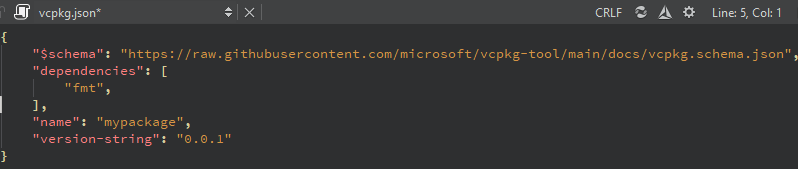
添加待管理的软件包
要将包添加到项目中:
- 在清单编辑器工具栏上选择“
 ”(Add vcpkg Package )。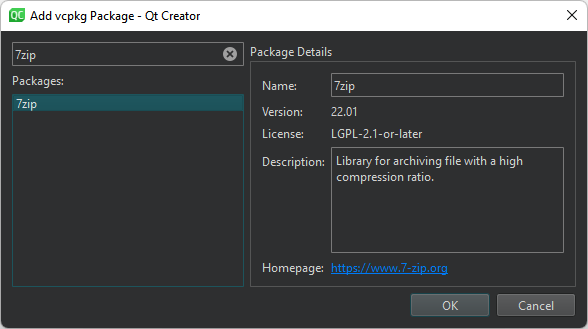
- 选择要添加到项目中的软件包。
- 选择“OK ”以返回编辑器。
- 重复上述步骤以添加更多软件包。
生成 CMake 配置文件代码
要生成示例 CMake 代码并将其复制到 `CMakeLists.txt ` 文件中:
- 在清单编辑器工具栏上选择“
 ”(CMake Code )。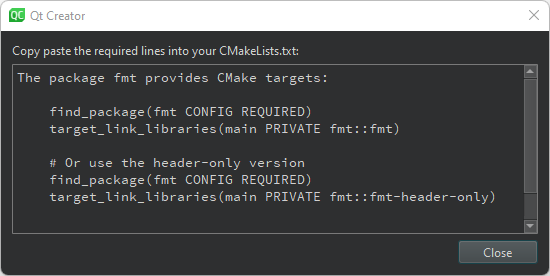
- 选择所需的示例代码,并将其复制粘贴到
CMakeLists.txt文件中。
设置 vcpkg 的路径
要设置 vcpkg 的安装目录路径,请在编辑器工具栏上选择“ ”(Configure )。
另请参阅 “设置 vcpkg 包管理器”和“创建 vcpkg 清单文件”。
Copyright © The Qt Company Ltd. and other contributors. Documentation contributions included herein are the copyrights of their respective owners. The documentation provided herein is licensed under the terms of the GNU Free Documentation License version 1.3 as published by the Free Software Foundation. Qt and respective logos are trademarks of The Qt Company Ltd in Finland and/or other countries worldwide. All other trademarks are property of their respective owners.
