
为 VxWorks 设备创建开发套件
要开发面向 VxWorks 的 Qt 应用程序,请构建Qt for VxWorks并创建一个 VxWorks开发套件。
注意:需启用 VxWorks 插件才能使用它。
要创建套件:
- 转至“Preferences ” > “Devices ” > “VxWorks ”。
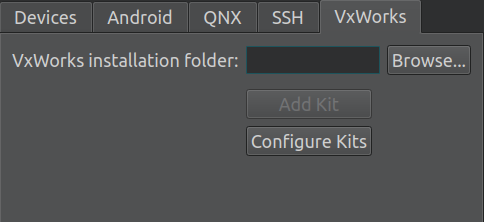
- 在“VxWorks installation folder ”中,输入 WindRiver 安装程序安装 VxWorks 的目录路径。
- 在“NFS export directory for VxWorks devices ”中,输入与设备共享的NFS目录的路径。
- 选择“Add Kit ”(开发套件)。
- 在“Kit name ”中,输入套件的名称。
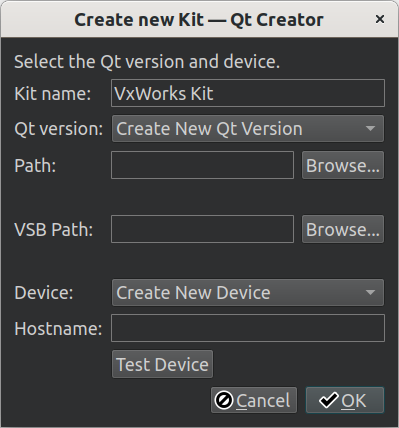
- 在“Path ”中,选择包含用于 Qt VxWorks 构建的 qmake 的文件夹。
- 在“VSB path ”中,输入 VxWorks 源代码构建 (VSB) 目录的路径。
- 在“Hostname ”中,输入设备的主机名或 IP 地址。
- 在“Username ”中,输入访问设备的用户名。
- 选择“OK ”以创建 VxWorks 套件。
- 转到“Projects ”>“Build & Run ”,为您的项目激活该套件。
注意:要部署 已构建的软件包,您可以在项目的部署配置中添加一个构建步骤,将项目的已构建二进制文件复制到与设备共享的 NFS 目录中。
另请参阅 “启用和禁用插件”、“操作指南:VxWorks”、“VxWorks 开发”以及“Qt for VxWorks”。
Copyright © The Qt Company Ltd. and other contributors. Documentation contributions included herein are the copyrights of their respective owners. The documentation provided herein is licensed under the terms of the GNU Free Documentation License version 1.3 as published by the Free Software Foundation. Qt and respective logos are trademarks of The Qt Company Ltd in Finland and/or other countries worldwide. All other trademarks are property of their respective owners.
