
将应用程序部署到 Android
由于将应用程序打包为 APK 包并非易事,Qt 提供了Android Deploy Qt工具。当您使用Qt for Android 开发套件部署应用程序时,Qt Creator 会运行该工具来生成必要的文件,并将其打包为 APK。有关更多信息,请参阅《Android 包模板》。
要查看androiddeployqt 工具生成的包,请选择“Open package location after build ”。
指定部署设置
要指定应用程序的部署设置,请转至“Projects ”>“Deploy Settings ”,并在“Active deployment configuration ”中选择一个部署配置。
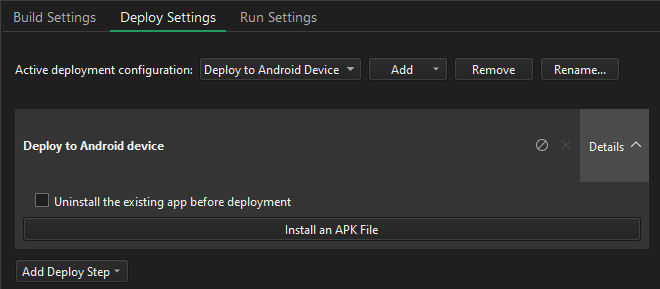
要为项目添加部署配置,请选择“Add ”。
要重命名当前的部署方法,请选择Rename 。
要删除当前的部署方法,请选择“Remove ”。
关于 Android 部署设置
Android 应用程序打包为名为“应用程序包”(APK)、“Android 应用包”(AAB)或“Android 归档”(AAR)的 ZIP 文件。您可以在设备上安装并运行 APK 文件。您可以将 AAB 文件上传到 Google Play 商店。
Qt for Android提供适用于 armv7a、arm64-v8a、x86 和 x86-64 的二进制文件。 若要在应用程序中支持多种不同的 ABI,请构建一个包含每种 ABI 对应二进制文件的 AAB。Google Play 商店会利用该 AAB 为请求下载的设备生成优化的 APK 包,并使用您的发布者密钥自动对其进行签名。
Qt Creator 支持以下 Android 应用程序的部署方式:
- 作为独立的可分发应用程序包(APK)。
- 作为应用包(AAB)在 Google Play 商店中分发。
- 作为 AAR,它本质上与 APK 和 AAB 格式不同,因为它是一个 Android 库。您可以将其用作 Android 应用模块的依赖项,但无法单独运行它。
并非所有 Qt 版本都支持 AAB。Qt 6.3.0 及更高版本在使用 CMake 构建时支持应用程序的多 ABI 构建。Qt 6.8.0 及更高版本支持 AAR。有关更多信息,请参阅《在 Android 上部署应用程序》。
要指定应用程序包的设置,请转至Projects >Build Settings >Build Android APK ,然后选择Details 。
有关为应用程序指定其他启动选项的更多信息,请参阅《指定 Android 运行设置》。
选择要部署的设备
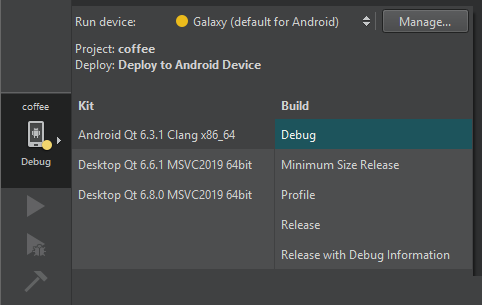
Qt Creator 将软件包部署到您在套件选择器中选定的 Android 设备上。要添加设备,请选择Manage 。
删除先前安装的内容
若要从设备中删除先前安装的文件,请转至“Projects ” > “Deploy Settings ”,然后选择“Uninstall the existing app before deployment ”。
安装预编译的 APK
要在设备上安装预编译的 APK(例如第三方应用程序),请转至Projects >Deploy Settings ,然后选择Install an APK File 。
另请参阅 《如何:为 Android 开发》和《Android 开发》。
Copyright © The Qt Company Ltd. and other contributors. Documentation contributions included herein are the copyrights of their respective owners. The documentation provided herein is licensed under the terms of the GNU Free Documentation License version 1.3 as published by the Free Software Foundation. Qt and respective logos are trademarks of The Qt Company Ltd in Finland and/or other countries worldwide. All other trademarks are property of their respective owners.
