
启用调试
若要为套件中选定的“运行设备”上运行的应用程序指定设置,请转至Projects >Run Settings 。
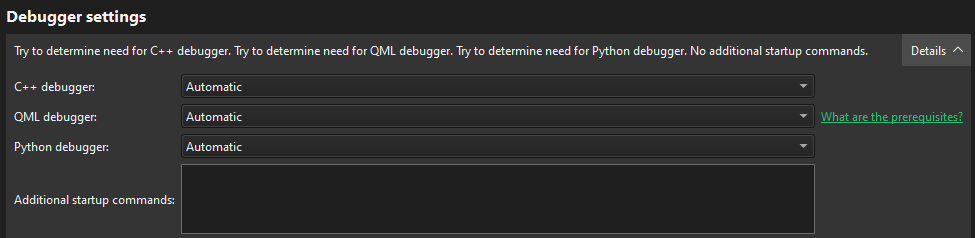
要选择要调试的语言,请在“Debugger Settings ”>“C++ debugger ”、“QML debugger ”或“Python debugger ”中选择“Automatic ”或“Enabled ”。
调试 C++
在“Additional startup commands ”中,您可以为 C++ 调试输入其他设置:
不过,通常可以留空此字段。
调试Qt Quick
在已知端口上打开套接字会带来安全风险。互联网上的任何人都可以连接到您正在调试的应用程序并执行任何 JavaScript 函数。因此,请确保该端口已通过防火墙得到妥善保护。
要为Qt Quick 应用程序项目创建支持调试的构建配置,您还需要全局启用QML调试,或在项目的Build Settings 中启用。
Copyright © The Qt Company Ltd. and other contributors. Documentation contributions included herein are the copyrights of their respective owners. The documentation provided herein is licensed under the terms of the GNU Free Documentation License version 1.3 as published by the Free Software Foundation. Qt and respective logos are trademarks of The Qt Company Ltd in Finland and/or other countries worldwide. All other trademarks are property of their respective owners.
