
将文件从待办事项列表中排除
若要将某些文件从待办事项关键词的扫描范围中排除,请前往Projects >Project Settings >To-Do 。
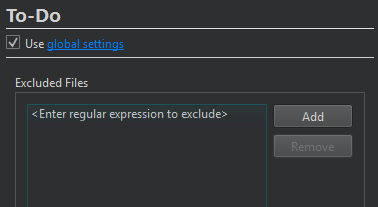
选择“Add ”,然后双击“Exclude Files ”中的占位符文本,输入与要排除的文件路径匹配的正则表达式。在 Windows 系统中,路径中的分隔符也应使用正斜杠 (/)。
选中“Use global settings ”中的链接以打开全局待办事项偏好设置。
另请参阅 “添加待办事项关键词”和“待办事项条目”。
Copyright © The Qt Company Ltd. and other contributors. Documentation contributions included herein are the copyrights of their respective owners. The documentation provided herein is licensed under the terms of the GNU Free Documentation License version 1.3 as published by the Free Software Foundation. Qt and respective logos are trademarks of The Qt Company Ltd in Finland and/or other countries worldwide. All other trademarks are property of their respective owners.
