
添加待办事项关键词
要添加用于列出待办事项的关键词:
- 转到“Preferences ” > “To-Do ”。
- 选择“Add ”。
- 为该关键词设置图标和行背景色。
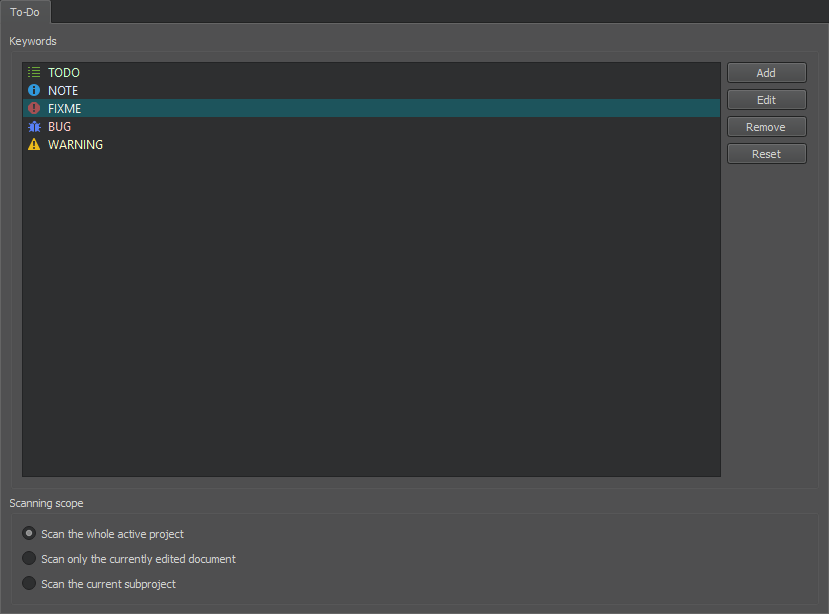
- 若要更改所选关键词的图标和线条背景色,请选择“Edit ”。
- 要删除所选关键词,请选择“Remove ”。
- 要将列表重置为预定义的关键字,请选择“Reset ”。您所做的所有更改都将永久丢失。
- 要确定默认显示整个项目、当前文件还是子项目中的关键词,请在“Scanning Scope ”组中选择相应的选项。
另请参阅 “从待办事项列表中排除文件”和“待办事项条目”。
Copyright © The Qt Company Ltd. and other contributors. Documentation contributions included herein are the copyrights of their respective owners. The documentation provided herein is licensed under the terms of the GNU Free Documentation License version 1.3 as published by the Free Software Foundation. Qt and respective logos are trademarks of The Qt Company Ltd in Finland and/or other countries worldwide. All other trademarks are property of their respective owners.
