
将项目与 GitLab 关联
将项目与 GitLab 令牌关联,即可在“Version Control ”面板中接收有关合并请求、问题或评论等事件的通知。系统每 15 分钟获取一次信息。 首次打开项目时,仅显示自您上次登录 GitLab 以来发生的事件。此后,将列出自上次成功获取数据以来发生的事件。
要与 GitLab 关联:
- 转至Projects >Project Settings >GitLab ,查看当前活动项目的 GitLab 设置。
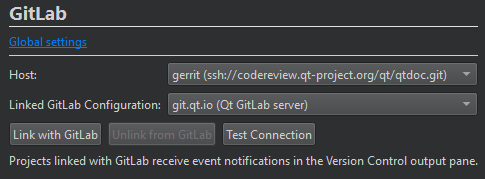
- 在Host 中,选择 GitLab 服务器的 URL。
- 在“Linked GitLab configuration ”中,选择要使用的 GitLab 服务器设置。
- 选择“Link with GitLab ”以在Version Control 窗格中接收事件通知。
若要使用 GitLab 配置中指定的访问令牌测试与主机的连接,请选择“Test Connection ”。
若要停止接收事件通知,请选择“Unlink from GitLab ”。
另请参阅 “启用和禁用插件”、“设置版本控制系统”、“使用常见的 VCS 功能”、“构建和运行项目”、“版本控制系统”、“使用 Git”以及“GitLab”。
Copyright © The Qt Company Ltd. and other contributors. Documentation contributions included herein are the copyrights of their respective owners. The documentation provided herein is licensed under the terms of the GNU Free Documentation License version 1.3 as published by the Free Software Foundation. Qt and respective logos are trademarks of The Qt Company Ltd in Finland and/or other countries worldwide. All other trademarks are property of their respective owners.
