
探索编译器代码
借助Compiler Explorer,您可以输入代码来探索编译器和解释器的功能。Qt Creator 支持 CompilerExplorer 支持的所有语言、编译器和库。您可以将 Compiler Explorer 会话保存为基于 JSON 的.qtce 文件。
注意:请启用 Compiler Explorer 插件才能使用该功能。
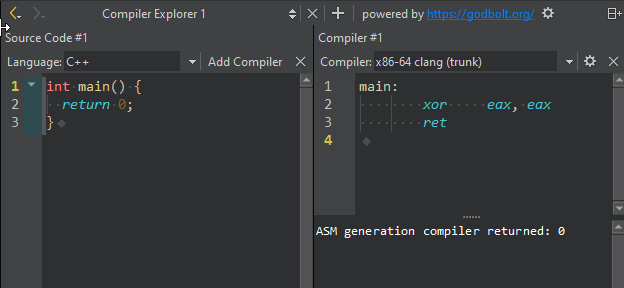
要查看编译器如何解析 C++ 或 Python 代码:
- 访问Tools >Compiler Explorer >Open Compiler Explorer 。
- 在Language 中,选择要编译的语言。
- 在“Compiler ”中,选择一个编译器以查看汇编代码。
- 输入代码以查看生成的汇编代码。
将鼠标悬停在汇编代码上,即可高亮显示对应的源代码行。
您还可以查看应用程序的状态和输出。
要探索多种编译器,请选择“Add Compiler ”。
设置编译器选项
在“Compiler ”字段旁选择“ ”(Options ),为所选编译器设置选项。
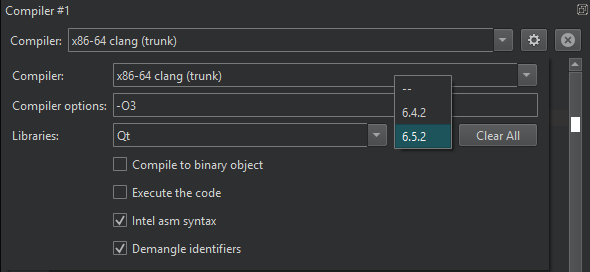
| 设置 | 值 |
|---|---|
| 编译器选项 | 传递给编译器的参数。添加选项以启用优化并更改编译的其他方面。例如,值-O3 可启用具有激进优化的优化器。 |
| 库 | 选择“Edit ”以添加代码所链接的库。在字段中输入内容以查找特定库。只有在您选中库名称旁边的库版本后,所选内容才会被保存。 |
| 执行代码 | 执行生成的可执行文件。 |
| 编译为二进制对象 | 将源代码转换为二进制可执行文件。 |
| Intel汇编语法 | 使用 Intel 汇编语法编写汇编代码。 |
| 解析标识符 | 从混淆符号中提取并解混淆标识符。名称混淆是在链接时向函数标识符添加描述性数据。该数据指示函数所属的命名空间和对象,以及它处理的参数及其顺序。 |
更改服务器 URL
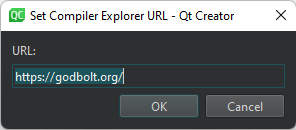
若要在其他 URL 上使用 Compiler Explorer:
- 在“Powered by ”旁边选择“ ”(Options )。
- 在“URL ”中,输入要使用的 Compiler Explorer 的地址。
另请参阅 “创建 Compiler Explorer 会话”、“启用和禁用插件”、“添加编译器”以及“添加自定义编译器”。
Copyright © The Qt Company Ltd. and other contributors. Documentation contributions included herein are the copyrights of their respective owners. The documentation provided herein is licensed under the terms of the GNU Free Documentation License version 1.3 as published by the Free Software Foundation. Qt and respective logos are trademarks of The Qt Company Ltd in Finland and/or other countries worldwide. All other trademarks are property of their respective owners.
