
显示即时归因
“即时指责”功能会在编辑器中的当前行标注其作者以及该行最后一次修改的日期。此外,该注释还可以选择性地显示提交主题。
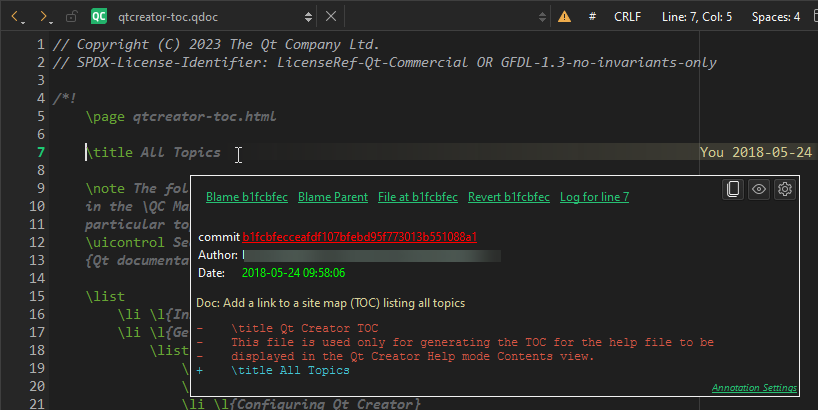
代码编辑器中的“即时归因”
要为当前文件显示即时责任追踪,请前往Tools >Git >Current File ,然后选择Instant Blame for <file> 。
注意: 未保存的文件不支持即时 责任追踪。
若要显示该行最新的实际更改,请将即时指责配置为忽略空格更改和行移动。有关更多信息,请参阅“即时指责设置”。
即时归因工具提示
将鼠标悬停在注释上时,会显示包含附加信息的工具提示。通过该工具提示,可执行以下操作:
| 菜单项 | 描述 |
|---|---|
| Blame <哈希值> | 打开哈希值对应版本的完整文件 {git blame}{blame}。 |
| 追溯父提交 | 打开hash 的父版本的完整文件 {git blame}{blame}。 |
| <hash> 处的文件 | 打开hash 版本中的文件内容。 |
| 第 <line> 行 | 显示包含所有修改过该行的提交的日志。 |
 (Copy Hash to Clipboard) (Copy Hash to Clipboard) | 将完整的哈希值复制到剪贴板。 |
| commit <hash> | 打开该提交的哈希值,显示完整描述和差异。 |
注意: 对于未提交的更改,这些操作大多 没有意义。
即时归咎设置
要更改即时指责设置,请转至“Preferences ” > “Version Control ” > “Git ”。
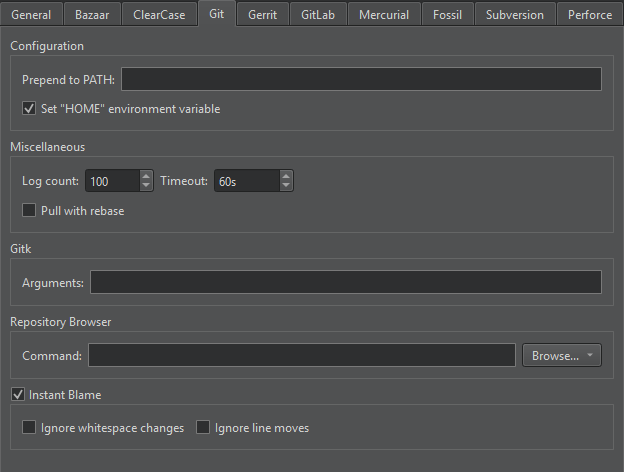
“版本控制”首选项中的 Git 选项卡
- 若要在编辑器中隐藏指责功能,请清除“Instant Blame ”选项。
- 若仅显示文本更改,请选中Ignore whitespace changes
- 若要在行被移动之前显示原始作者和日期,请选中“Ignore line moves ”。
- 要在编辑器中显示提交主题(位于日期和作者旁边),请选中“Show commit subject ”。
另请参阅 《操作指南:使用 Git》、《Git 使用指南》和“git blame”。
Copyright © The Qt Company Ltd. and other contributors. Documentation contributions included herein are the copyrights of their respective owners. The documentation provided herein is licensed under the terms of the GNU Free Documentation License version 1.3 as published by the Free Software Foundation. Qt and respective logos are trademarks of The Qt Company Ltd in Finland and/or other countries worldwide. All other trademarks are property of their respective owners.
