
设置高 DPI 缩放
Qt Creator 支持的操作系统在高每英寸点数(DPI)缩放的实现程度上各不相同。因此,Qt Creator 在不同操作系统上对高 DPI缩放的处理方式也不同:
- 在 macOS 上,Qt Creator 强制启用高 DPI 缩放,这意味着它允许 Qt 使用系统缩放因子作为Qt Creator 的缩放因子。
- 在 Linux 上,Qt Creator 将是否启用高 DPI 缩放留给用户决定,因为不同发行版和窗口系统中的处理方式差异巨大,无法可靠地自动完成。
将缩放因子或 DPI 设置为与物理显示器的 DPI 完全一致,可能会因涉及分数缩放而导致视觉效果不佳。Rounding 将缩放因子设置为以 25% 为增量,可以改善效果。
要设置 DPI 舍入策略:
- 选择“Preferences ” > “Environment ” > “Interface ”。
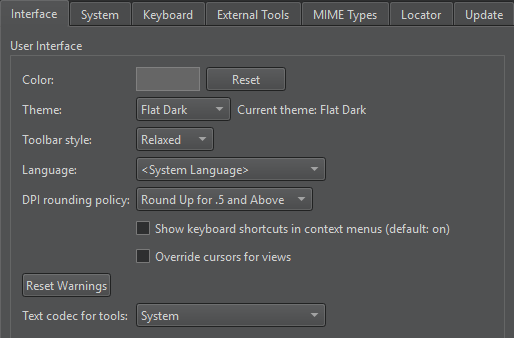
- 在DPI rounding policy 中,选择将DPI向上或向下舍入的选项。
- 重新启动Qt Creator 以使更改生效。
另请参阅 《操作指南:调整用户界面》和《调整用户界面》。
Copyright © The Qt Company Ltd. and other contributors. Documentation contributions included herein are the copyrights of their respective owners. The documentation provided herein is licensed under the terms of the GNU Free Documentation License version 1.3 as published by the Free Software Foundation. Qt and respective logos are trademarks of The Qt Company Ltd in Finland and/or other countries worldwide. All other trademarks are property of their respective owners.
