
设置显示的最近文件数量
要在“File ”>“Recent Files ”中设置要列出的文件数量:
- 选择“Preferences ” > “Environment ” > “System ”。
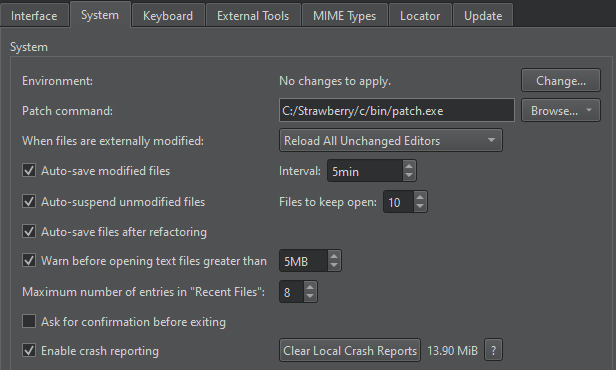
- 在“Maximum number of entries in "Recent Files" ”中,设置要显示的文件数量。
另请参阅 《操作指南:调整用户界面》和《调整用户界面》。
Copyright © The Qt Company Ltd. and other contributors. Documentation contributions included herein are the copyrights of their respective owners. The documentation provided herein is licensed under the terms of the GNU Free Documentation License version 1.3 as published by the Free Software Foundation. Qt and respective logos are trademarks of The Qt Company Ltd in Finland and/or other countries worldwide. All other trademarks are property of their respective owners.
