
连接到 Axivion 仪表盘服务器
您可以连接到 Axivion 仪表盘服务器,并将仪表盘项目映射到本地项目。
注意:请启用 Axivion 插件才能使用该功能。
要连接到 Axivion 仪表盘服务器:
- 转至“Preferences ” > “Analyzer ” > “Axivion ”。
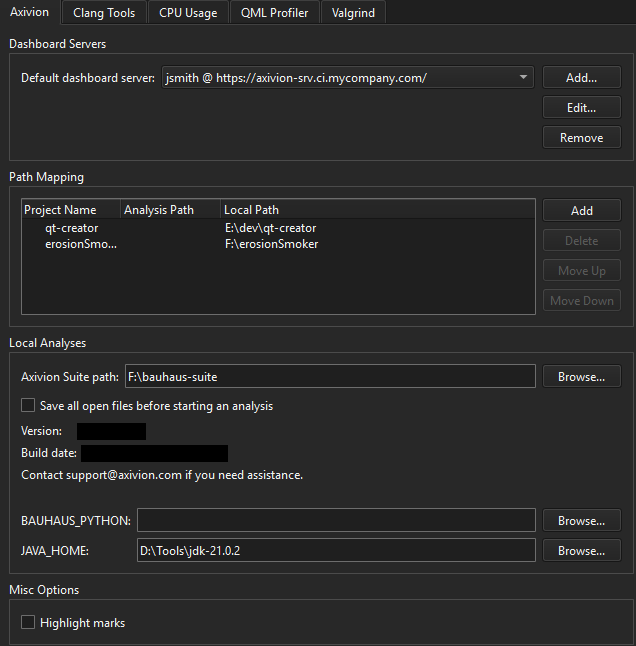
- 选择“Add ”以添加与 Axivion 仪表板服务器的新连接,或选择“Edit ”以修改现有连接:
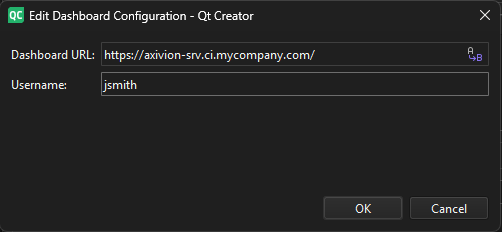
- 在“Dashboard URL ”中,输入服务器的 URL。
- 选择“Anonymous authentication ”以使用匿名身份验证。
- 在“Username ”中,输入访问服务器的用户名。
首次访问服务器时,必须输入与用户名对应的密码。该密码将安全地存储在操作系统提供的钥匙串中,以备日后使用。
选择“Highlight marks ”可在编辑器的滚动条上突出显示发现的问题。
选择“Remove ”可移除当前选中的与 Axivion 仪表板服务器之间的连接。
映射路径
仪表板上的项目可能包含子项目,这些子项目也会显示在仪表板上,因为它们是单独分析的。
要将仪表板项目映射到本地项目:
- 在“Path Mapping ”中,选择“Add ”。
- 在“Project name ”中,输入仪表板上的项目名称。
- 在Analysis path 中,输入子项目的分析路径。仅在映射子项目分析时才需要此信息。
- 在Local path 中,输入计算机上该项目的路径。
本地分析
要执行本地分析,请指定其他设置。
在“Axivion Suite path ”中,输入本地安装的 Axivion Suite 的路径。
在“BAUHAUS_PYTHON ”中,如果系统无法自动找到用于本地分析的 Python 可执行文件,请输入其路径。
在“JAVA_HOME ”中,如果无法自动找到 Java 运行时或 Java 开发工具包,请输入其路径。
选中“Save all open files before starting an analysis ”选项,可在开始分析前自动保存编辑器中打开的文件。
另请参阅 “启用和禁用插件”、“查看 Axivion 静态代码分析结果”、“本地分析”以及“分析代码”。
Copyright © The Qt Company Ltd. and other contributors. Documentation contributions included herein are the copyrights of their respective owners. The documentation provided herein is licensed under the terms of the GNU Free Documentation License version 1.3 as published by the Free Software Foundation. Qt and respective logos are trademarks of The Qt Company Ltd in Finland and/or other countries worldwide. All other trademarks are property of their respective owners.
