
代码美化工具
使用 Artistic Style、ClangFormat 或 Uncrustify 对源代码进行格式化。
在保存源代码文件时,自动对其应用缩进和样式。可使用预定义的样式,或自定义样式。
设置代码美化器首选项
要设置文件美化首选项,请转至“Preferences ” > “Beautifier ” > “General ”。
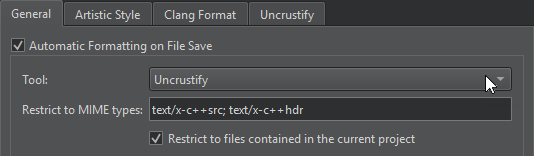
下表介绍了您可以在“General ”选项卡中设置的偏好设置。
| 首选项 | 描述 |
|---|---|
| Automatic formatting on file save | 使用在“Tool ”字段中选择的工具保存文件时,自动美化文件。 若要在保存文件时暂时禁用此设置,请转至“File ”并选择“Save Without Formatting ”。 |
| Tool | 用于格式化源代码文件的工具。每次只能选择一个工具。 |
| Restrict to MIME types | 要美化的文件的 MIME 类型,用分号分隔。若要将该工具应用于所有文件,请将此字段留空。 此设置仅在保存时自动美化文件时生效。若要在选择菜单项以美化当前打开的文件时限制 MIME 类型,请在特定工具的选项卡中指定此选项。 |
| Restrict to files contained in the current project | 仅美化属于当前项目的文件。 |
美化工具首选项
要设置要使用的工具的偏好设置,请转到“Artistic Style ”、“ClangFormat ”或“Uncrustify ”选项卡。
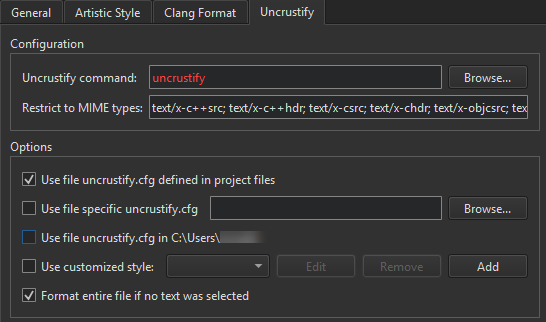
然后,在“Configuration ”中:
- 在Artistic Style command 、ClangFormat command 或Uncrustify command 中指定工具可执行文件的路径。
- 在“Restrict to MIME types ”中,定义需要美化文件的 MIME 类型。当您选择菜单项以格式化当前打开的文件时,此设置将生效。
- 在Options 中,选择定义源文件中要使用样式的配置文件。如果选择了多个选项,则按从上到下的顺序应用。可用的选项取决于所选工具。
要设置以下选项,必须已安装其中一种工具。
| 选项 | 值 |
|---|---|
| Use file *.astylerc defined in project files Use file uncrustify.cfg defined in project files | 将项目文件中定义的配置文件用作所选工具的配置文件。 |
| Use specific config file Use file specific uncrustify.cfg | 用作所选工具配置文件的文件。 |
| Use file uncrustify.cfg in <$HOME> Use file .astylerc or acstylerc in <$HOME> | 将用户主目录中的指定文件用作所选工具的配置文件。 |
| Use customized style | 设置您自己的代码风格。 |
| Format entire file if no text was selected | 当编辑器中未选中任何文本,且您选择了“Format Selected Text ”时,对整个文件进行格式化。 |
使用预定义的 ClangFormat 样式
要使用预定义的 ClangFormat 样式,请转到“ClangFormat ”,然后在“Use predefined style ”中选择一种样式。
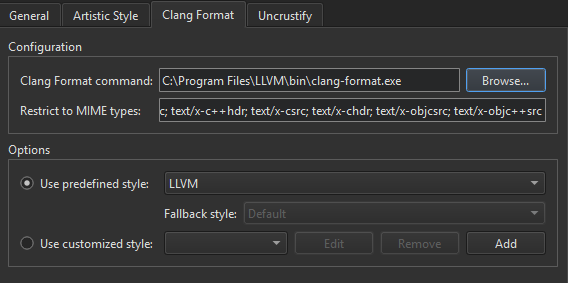
选择“File ”以从位于源文件所在目录或其父目录中的.clang-format 或_clang-format 文件中加载样式配置。
在“Fallback style ”中,选择当样式配置文件不可用时要使用的备用样式。选择“Default ”以使用默认样式。选择“None ”以跳过格式化。
定义样式
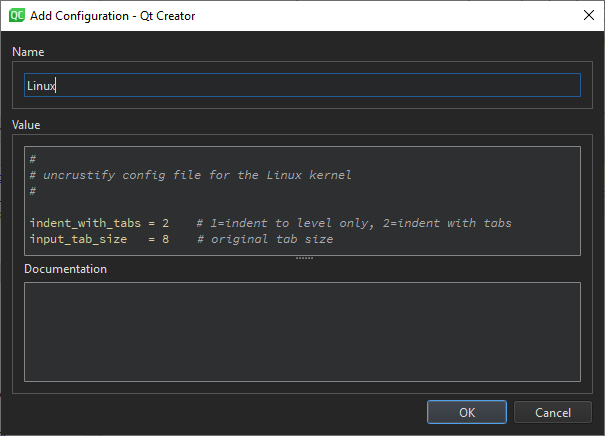
要定义自定义样式,请选择“Use customized style ”,然后选择“Add ”。
在“Add Configuration ”对话框中设置代码样式。该对话框提供语法高亮、自动完成和上下文相关帮助。
Copyright © The Qt Company Ltd. and other contributors. Documentation contributions included herein are the copyrights of their respective owners. The documentation provided herein is licensed under the terms of the GNU Free Documentation License version 1.3 as published by the Free Software Foundation. Qt and respective logos are trademarks of The Qt Company Ltd in Finland and/or other countries worldwide. All other trademarks are property of their respective owners.
