
设置编译器首选项
前往“Preferences ” > “Kits ” > “Compilers ”,查看已注册的编译器。您可以将自定义编译器添加到列表中。
若要使用 GCC、MinGW、Clang 或 QCC 构建应用程序,请指定编译器所在目录的路径,并从可用版本列表中选择应用程序二进制接口 (ABI) 版本。 您还可以创建自定义 ABI 定义。对于 QCC,还需在SPD path 中指定 QNX 软件开发平台 (SDP) 的路径。
为了使 Microsoft Visual C++ 编译器 (MSVC) 和 clang-cl 能够找到系统头文件、库以及链接器,Qt Creator 会在命令提示符中执行它们,您需要通过vcvarsall.bat 设置环境。对于这些编译器,您还需在Initialization 中指定用于设置命令提示符的脚本路径。
您需在Preferences >Kits 中为每个套件指定要使用的编译器。
要根据编译器类型设置编译器首选项:
- 转到Preferences >Kits >Compilers 。
- 从列表中选择一个编译器。
- 在“Name ”中,为编译器输入一个名称,以便在“Qt Creator ”中识别它。
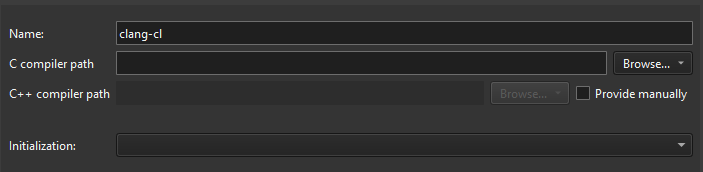
添加 clang-cl 编译器。
- 在“C compiler path ”字段中,输入 C 编译器所在目录的路径。
在Browse (macOS 上的Choose )的下拉菜单中选择Remote ,以添加远程 Linux 设备或 Docker 中的编译器路径。
- 在“C++ compiler path ”中,选择“Provide manually ”以输入 C++ 编译器所在目录的路径。
选择“Remote ”以添加远程 Linux 设备或 Docker 中的编译器路径。
- 在“Initialization ”中,选择“
vcvarsall.bat”文件以配置要使用的命令提示符。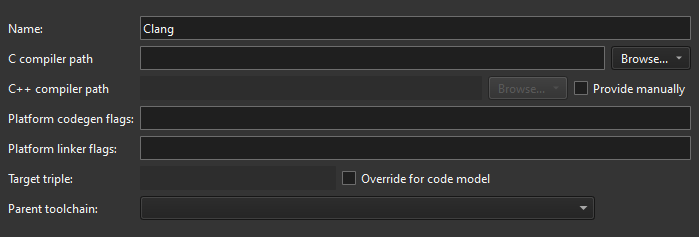
添加 Clang 编译器。
- 在“Platform codegen flags ”中,检查传递给编译器的、用于指定目标平台架构的标志。
- 在“Platform linker flags ”中,检查传递给链接器的、用于指定目标平台架构的标志。
- 在“Target triple ”中,指定 GCC 目标架构。如果代码模型服务因 Clang 不支持该目标架构而失败,请选择“Override for code model ”。
- 在Parent toolchain 中,请选择一个MinGW编译器,这是因为Clang没有自己的标准库。
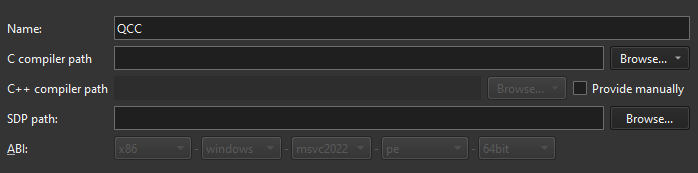
添加 QCC 编译器。
- 在“SDP path ”中,指定 QNX 软件开发平台 (SDP) 的路径。
- 在“ABI ”中,为目标架构输入一个标识符。该标识符用于在套件内部出现 ABI 不匹配时发出警告。
- 在“Name ”中,为编译器输入一个名称,以便在“Qt Creator ”中识别它。
另请参阅 《操作指南:管理套件》、《套件管理》和《支持的平台》。
Copyright © The Qt Company Ltd. and other contributors. Documentation contributions included herein are the copyrights of their respective owners. The documentation provided herein is licensed under the terms of the GNU Free Documentation License version 1.3 as published by the Free Software Foundation. Qt and respective logos are trademarks of The Qt Company Ltd in Finland and/or other countries worldwide. All other trademarks are property of their respective owners.
