
显示
要设置Qt Creator 在编辑器中显示代码和文本的偏好设置,请选择“Preferences ” > “Text Editor ” > “Display ”。
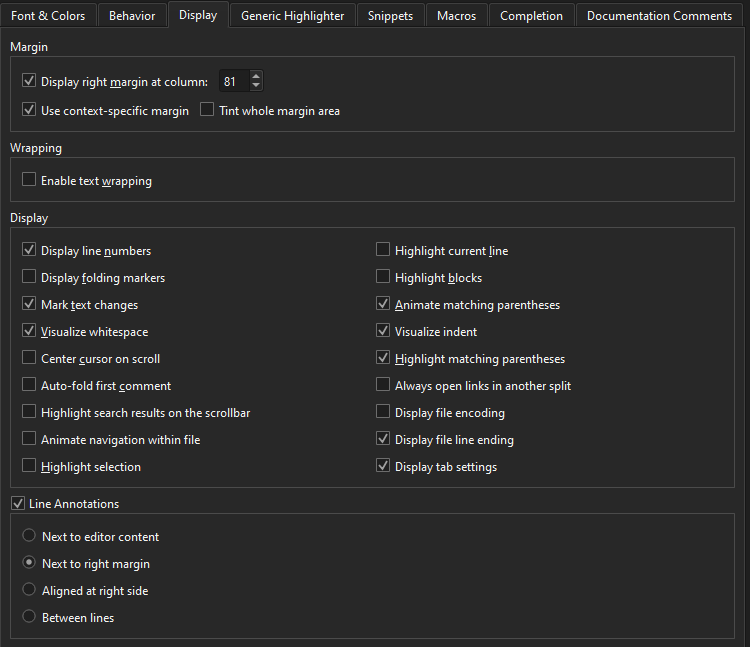
设置边距
在“Margin ”组中,您可以开启一条垂直线来标记编辑器中的列,这有助于将行控制在一定长度内。
下表描述了您可以设置的边距选项。
| 首选项 | 描述 |
|---|---|
| Display right margin after column | 在指定列之后显示一条垂直线。默认值为第 80 列。 |
| Tint whole margin area | 将边距以外的区域涂成阴影。在选中“Display right margin after column ”时可用。 |
| Use context-specific margin | 如果当前上下文中提供其他边距(例如为 ClangFormat 插件配置的列限制),则使用该边距。 |
| Editor content width | 设置用于显示文本内容的编辑器窗口宽度百分比。默认值 100% 表示使用全部宽度。当设置为 50% 时,编辑器宽度的一半用于显示内容,剩余宽度则分配给左右边距,以使内容居中显示。 |
文本换行
若要将长行换行以适应编辑器宽度,请在“Wrapping ”组中选择“Enable text wrapping ”。此选项仅在“Font & Colors ”首选项中将“Line spacing ”设置为 100% 时可用。
设置显示首选项
下表介绍了您可以在“Display ”组中设置的偏好选项。
| 偏好设置 | 说明 |
|---|---|
| Display line numbers | 在编辑器中显示行号。 |
| Display folding markers | 显示用于折叠和展开代码块的标记。 |
| Mark text changes | 标记自文件打开或上次保存以来您添加或修改过的行。 |
| Visualize whitespace | 在编辑器中显示制表符和空格。 |
| Center cursor on scroll | 在滚动时保持光标垂直居中。 |
| Auto-fold first comment | 自动折叠文件中的第一个注释块,例如许可证头部。 |
| Highlight search results on the scrollbar | 在滚动条上标记搜索结果的位置。 |
| Animate navigation within file | 在同一文件内跳转到其他位置时,对视图进行动画效果处理。 |
| Highlight selection | 为当前所选文本在文件中的其他出现位置添加彩色背景和滚动条标记。 |
| Highlight current line | 突出显示包含光标的行。 |
| Highlight blocks | 突出显示离光标最近的大括号所包围的代码块。另请参阅“突出显示代码块”。 |
| Animate matching parentheses | 当光标位于匹配的圆括号、大括号或方括号旁边时,对该括号进行动画效果显示。 |
| Visualize indent | 显示垂直缩进引导线。 |
| Highlight matching parentheses | 突出显示匹配的圆括号、大括号和方括号。 |
| Always open links in another split | 在另一个分屏视图(而非当前视图)中打开链接,例如指向符号定义的链接。 |
| Display file encoding | 在编辑器状态栏中显示当前文件的文本编码。 |
| Display file line ending | 在编辑器状态栏中显示当前文件的行尾样式。 |
| Display tab settings | 在编辑器状态栏中显示当前文件的缩进设置。 |
| Enable minimap | 在滚动条旁边显示文件的缩略图(缩小后的概览)。 |
显示行注释
行注释会在编辑器中显示行旁边的附加信息,例如代码分析结果或来自git blame 的版本控制信息。
要关闭行注释,请清除“Line Annotations ”组中的Line Annotations 选项。
若要选择注释的显示位置,请使用Line Annotations :
- Next to editor content 将注释显示在该行代码的正后方。
- Next to right margin 将注释对齐到右边距;如果行长超过边距,则将注释显示在代码之后。
- Aligned at right side 将注释对齐在编辑器的右侧。这是默认设置。
- Between lines 将注释显示在独立行上,位于代码行之间。
另请参阅 《如何:配置编辑器》、《配置编辑器》、《突出显示代码块》、《分析代码》和《git blame》。
Copyright © The Qt Company Ltd. and other contributors. Documentation contributions included herein are the copyrights of their respective owners. The documentation provided herein is licensed under the terms of the GNU Free Documentation License version 1.3 as published by the Free Software Foundation. Qt and respective logos are trademarks of The Qt Company Ltd in Finland and/or other countries worldwide. All other trademarks are property of their respective owners.
