
通用高亮器
Qt Creator 使用KSyntaxHighlighting引擎结合 Kate 语法定义,为没有专用支持的文件(如 Python 或 shell 脚本文件)中的代码进行高亮显示。要管理该引擎使用的语法高亮定义,请选择“Preferences ” > “Text Editor ” > “Generic Highlighter ”。
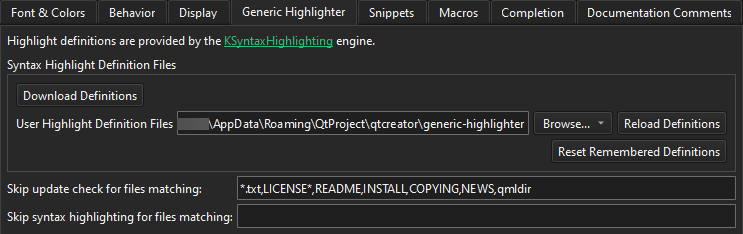
下表介绍了您可以设置的偏好选项。
| 首选项 | 描述 |
|---|---|
| Download Definitions | 下载缺失的语法定义文件并更新现有的语法定义文件。 |
| User Highlight Definition Files | 设置Qt Creator 在下载的语法定义文件之外,用于查找您自己的语法定义文件的文件夹。 |
| Reload Definitions | 重新加载在Qt Creator 外部修改过的定义文件。 |
| Reset Remembered Definitions | 重置Qt Creator 为可能与多个定义相关联的文件所记住的高亮定义。请参阅“下载高亮定义”。 |
| Skip update check for files matching | 列出支持通配符的文件模式(以逗号分隔),对于这些模式,Qt Creator 不会提示您下载缺失的语法高亮定义。 |
| Skip syntax highlighting for files matching | 列出支持通配符的文件模式(以逗号分隔),对于这些模式,Qt Creator 完全不会应用通用语法高亮。 |
另请参阅 《如何:配置编辑器》、《配置编辑器》以及《下载高亮定义》。
Copyright © The Qt Company Ltd. and other contributors. Documentation contributions included herein are the copyrights of their respective owners. The documentation provided herein is licensed under the terms of the GNU Free Documentation License version 1.3 as published by the Free Software Foundation. Qt and respective logos are trademarks of The Qt Company Ltd in Finland and/or other countries worldwide. All other trademarks are property of their respective owners.
