
打开终端
要打开“Terminal ”视图:
- 转到“View ” > “Output ”,然后选择“Terminal ”。
- 选择“Terminal ”输出视图。
- 按Alt+5(在 macOS 上为Cmd+5)。
- 在“Projects ” > “Run Settings ”中为某个应用程序选择“Run in Terminal ”,然后运行该应用程序。
- 在Projects >Build Settings >Build Environment 中选择Open Terminal 按钮。
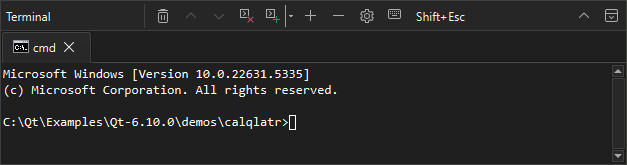
在终端中查看输出
- 要在终端中选择一个单词,请双击该单词。
- 要选中整行,请三击该行。
- 要全选文本,请在上下文菜单中选择“Select All ”,或按Ctrl+A。
- 要在浏览器中打开链接、在编辑器中打开文件或在“项目”视图中打开文件夹,请将鼠标悬停在它们上,并按住Ctrl 键。
- 要在输出中进行搜索,请选择Ctrl+F。
在终端中运行Qt Creator 命令
要在终端中使用qtc 的命令行选项,请输入:
qtc [option] [filename[:line_number[:column_number]]]
要查看选项,请输入:
qtc -help插入Qt Creator 变量
若要在终端中插入Qt Creator 变量的展开值,请在Insert Macro Variable 列表中选中它们。
设置键盘快捷键首选项
终端中,Qt Creator 的大多数键盘快捷键均被禁用,但用于打开终端首选项或定位器以及退出Qt Creator 的快捷键除外。若要防止Qt Creator 的键盘快捷键干扰终端操作,请选择“Qt Creator 的快捷键具有优先级。" src="images/keyboardlock.png" title="Qt Creator 的快捷键具有优先级。"/> ”。
若要将Esc键作为终端命令发送,而非关闭终端,请选中“Shift+Esc ”。若要将此设置为默认行为,请前往Preferences >Terminal >Block shortcuts in terminal 。
在单独窗口中运行终端
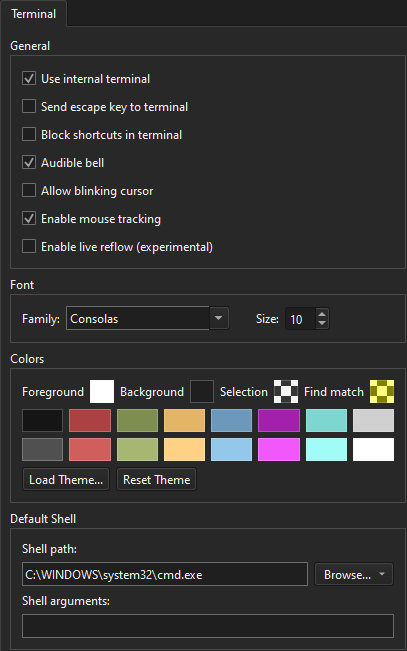
若要在单独窗口中打开终端,请前往Preferences >Terminal ,并取消勾选Use internal terminal 。
在 Linux 和 macOS 上使用系统终端
在 Linux 和 macOS 上,您可以通过选择“Preferences ” > “Environment ” > “System ”来设置终端的打开方式。
另请参阅 “使用Qt Creator 变量”、“查看输出”、“命令行选项”和“键盘快捷键”。
Copyright © The Qt Company Ltd. and other contributors. Documentation contributions included herein are the copyrights of their respective owners. The documentation provided herein is licensed under the terms of the GNU Free Documentation License version 1.3 as published by the Free Software Foundation. Qt and respective logos are trademarks of The Qt Company Ltd in Finland and/or other countries worldwide. All other trademarks are property of their respective owners.
