
Perforce
Perforce 是由 Perforce Software 公司开发的一款高效的软件配置管理系统。
注意:请启用 Perforce 插件才能使用它。
配置 Perforce
要设置 Perforce 首选项,请选择“Preferences ” > “Version Control ” > “Perforce ”:
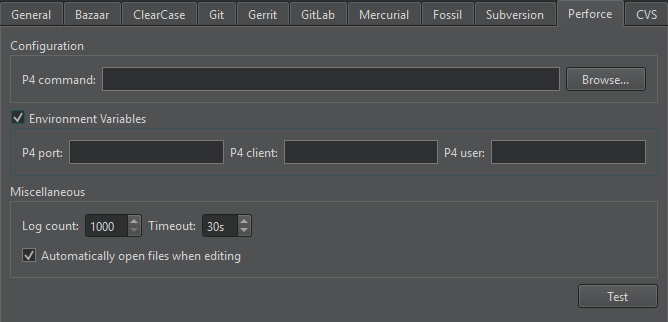
在“P4 command ”中,设置命令行客户端可执行文件的路径。
在“P4 user ”、“P4 client ”和“P4 port ”中设置工作区详细信息。
使用配置文件
若要为多个项目分别指定工作区详细信息,请使用配置文件:
- 在每个项目的顶级项目目录中创建一个名为
p4config.txt的配置文件。 - 转到“Preferences ” > “Version Control ” > “Perforce ”。
- 清除“Environment Variables ”。
- 要将
P4CONFIG设置为使用您创建的文件,请在命令行中执行以下命令一次:p4 set P4CONFIG=p4config.txt
有关使用P4CONFIG 变量的更多信息,请参阅Perforce:P4CONFIG。
其他 Perforce 函数
除了“使用常见版本控制系统功能”中描述的标准版本控制系统功能外,您还可以在“Tools >Perforce ”中访问其他功能。
| 菜单项 | 描述 |
|---|---|
| Edit File | 在客户端工作区中打开文件进行编辑。 |
| Opened | 列出当前打开以供编辑的文件。 |
| Pending Changes | 将文件分组以进行提交。 |
| Describe | 查看变更列表及其所含文件的信息。 |
另请参阅 “启用和禁用插件”、“设置版本控制系统”、“使用常见的 VCS 功能”以及“版本控制系统”。
Copyright © The Qt Company Ltd. and other contributors. Documentation contributions included herein are the copyrights of their respective owners. The documentation provided herein is licensed under the terms of the GNU Free Documentation License version 1.3 as published by the Free Software Foundation. Qt and respective logos are trademarks of The Qt Company Ltd in Finland and/or other countries worldwide. All other trademarks are property of their respective owners.
