
Subversion
Subversion 是一个开源版本控制系统。
注意:请启用 Subversion 插件才能使用它。
除了“使用常见 VCS 功能”中描述的标准版本控制系统功能外,您还可以转到“Tools ” > “Subversion ”,然后选择“Describe ”来显示某个修订版的提交日志消息。
您可以将 Git 用作 Subversion 服务器的客户端。有关详细信息,请参阅《将 Git 与 Subversion 结合使用》。
Subversion 首选项
要设置 Subversion 首选项,请转至Preferences >Version Control >Subversion 。
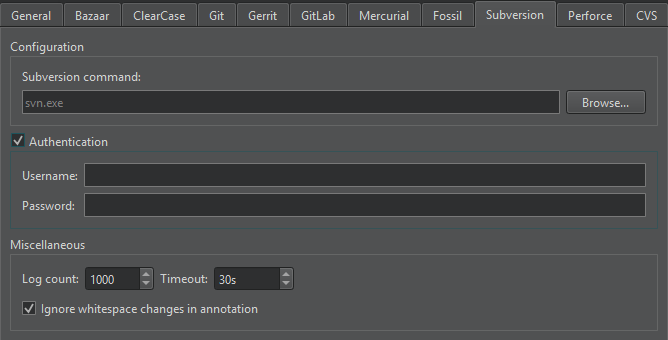
| 首选项 | 描述 |
|---|---|
| Subversion command | 指定命令行客户端可执行文件的路径。 |
| Username | 如果服务器要求使用Authentication 身份验证,请指定访问代码库的用户名。 |
| Password | 如果服务器要求使用Authentication ,请指定访问存储库的用户名。 |
| Log count | 设置日志的最大行数。 |
| Timeout | 设置版本控制操作的超时时间。 |
| Ignore whitespace changes in annotation | 在注释视图中隐藏空格变化。 |
另请参阅 “启用和禁用插件”、“设置版本控制系统”、“使用常见的 VCS 功能”以及“版本控制系统”。
Copyright © The Qt Company Ltd. and other contributors. Documentation contributions included herein are the copyrights of their respective owners. The documentation provided herein is licensed under the terms of the GNU Free Documentation License version 1.3 as published by the Free Software Foundation. Qt and respective logos are trademarks of The Qt Company Ltd in Finland and/or other countries worldwide. All other trademarks are property of their respective owners.
