
Qtプロジェクトの作成
プロジェクトを作成するには、特定のプロジェクトタイプ用のプリセットを選択します:
- Welcome に移動し、[New project] を選択します。
- Project で、プロジェクトの種類を選択します。
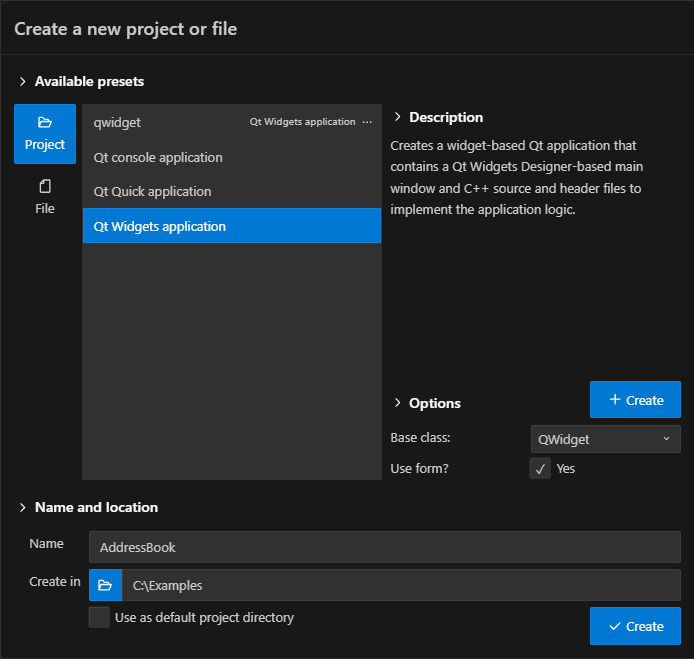
- 「Name 」で、プロジェクト名を入力します。
- 「Create in 」で、プロジェクトファイルのパスを入力します。例:
C:\Qt\examples。 - 「Options 」で、プロジェクトの種類に応じてオプションを設定します。
- 「Open in new window 」を選択してプロジェクトファイルを作成し、新しい VS Code ウィンドウで開きます。新しいプロジェクトをワークスペースに追加するには、「Add to workspace 」を選択します。
- プロジェクト用の CMake キットを選択します。
Create in にデフォルトで表示されるプロジェクトフォルダを設定するには、Command Palette に移動し、Open Qt settings を選択します。
カスタムプリセットの作成
プロジェクトまたはファイルタイプの「Options 」を変更する際は、「Create 」を選択してカスタムプリセットを作成できます。カスタムプリセットはプリセットリストに表示され、それらを選択して新しいプロジェクトやファイルを作成できます。
カスタムプリセットの変更を保存するには、[Save] を選択します。
関連項目 :チュートリアル「Qt Widgets アプリケーション」、「プロジェクトへのファイルの追加」、および「Qt 設定」。
© 2026 The Qt Company Ltd. Documentation contributions included herein are the copyrights of their respective owners. The documentation provided herein is licensed under the terms of the GNU Free Documentation License version 1.3 as published by the Free Software Foundation. Qt and respective logos are trademarks of The Qt Company Ltd in Finland and/or other countries worldwide. All other trademarks are property of their respective owners.
