
4.2. Clones
4.2.1. Introduction
Clones are code fragments that appear more than once in a code base. They are usually created by copy-pasting code instead of refactoring and reusing existing code. Clones can lead to software erosion because they make it harder to maintain the code. If a cloned code fragment needs to be changed, the change needs to be made in all the copies, which can lead to bugs if some copies are missed.
In the context of the Axivion Suite, clones can be categorized into four types:
Type 1: Identical clones - Code fragments that are textually identical (except for whitespace).
Type 2: Parameterized clones - Code fragments that are structurally identical but may have differences in variable names, literals, or types.
Type 3: Near-miss clones - Code fragments that are structurally similar but may have added or removed statements or comments. Unlike type 1 and type 2 clones, type 3 findings are hints for already existing potential inconsistencies: one side of the clone pair may have already diverged from the other, for example because a bug fix or improvement was applied to one copy but not to the other.
Type 4: Semantic clones - Code fragments that are functionally similar but may have different implementations or are written in different programming languages. Note that clones of type 4 currently cannot be detected by the Axivion Suite.
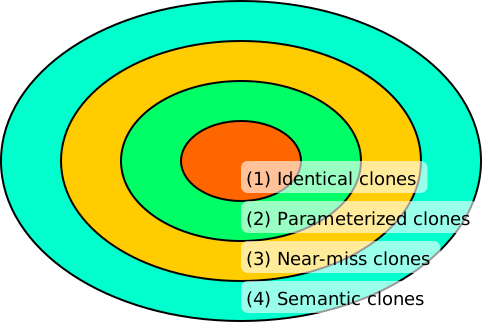
The above diagram shows the relationship between the four types of clones. For example, all identical clones (type 1) are also parameterized clones (type 2), but not the other way around.
4.2.1.1. Examples
The following C++ examples illustrate the first three clone types.
Type 1: Identical clones — The two fragments are textually identical, for example because one was copy-pasted from the other:
// in temperature.cpp
float toCelsius(float fahrenheit)
{
    return (fahrenheit - 32.0f) * 5.0f / 9.0f;
}

// in display.cpp — exact copy
float toCelsius(float fahrenheit)
{
    return (fahrenheit - 32.0f) * 5.0f / 9.0f;
}
Type 2: Parameterized clones — The two fragments are structurally identical but use different variable names and types:
// Fragment 1
int sumPositive(const std::vector<int>& values)
{
    int result = 0;
    for (int v : values)
    {
        if (v > 0)
            result += v;
    }
    return result;
}

// Fragment 2
double computeTotal(const std::vector<double>& numbers)
{
    double total = 0.0;
    for (double n : numbers)
    {
        if (n > 0)
            total += n;
    }
    return total;
}
- Type 3: Near-miss clones — The two fragments started as a type 1 clone pair.
However, one of the fragments was later modified by adding an additional statement.
// Fragment 1 - original, adjusted later
void processData(int* arr, int size)
{
    if (size <= 0)
    {
        return;
    }
    printf("Processing data of size %d\n", size);
    for (int i = 0; i < size; i++)
    {
        arr[i] = arr[i] * 2;
        if (arr[i] < 0 || arr[i] > 100)
        {
            arr[i] = 100;
        }
    }
}

// Fragment 2 - unadjusted copy of original
void processData(int* arr, int size)
{
    if (size <= 0)
    {
        return;
    }
    for (int i = 0; i < size; i++)
    {
        arr[i] = arr[i] * 2;
        if (arr[i] < 0 || arr[i] > 100)
        {
            arr[i] = 100;
        }
    }
}
4.2.2. Clone Detection
The Axivion Suite provides clone detection capabilities for the following programming languages:
C and C++ (via C++CloneDetection)
C# (via C#CloneDetection)
Rust (via RustCloneDetection)
QML (via QMLCloneDetection)
4.2.2.1. How To Configure Clone Detection
Open the configuration for the desired project in the
axivion_configGUI.Enable the desired clone detection rule(s) in the CloneDetections rule group for the programming language(s) you want to analyze.
Perform the analysis and review the findings. The findings will include pairs of code fragments that are considered clones, what type of clone they are, and their locations in the source code.
If necessary, adjust the exclusion filters to exclude certain directories or files from clone detection (e.g. generated files), or to exclude clone pairs based on specific criteria.
4.2.2.2. Configuration Options
The following configuration options are common to all clone detection rules.
Common Configuration Options
Note
Weight is a measure of the structural size of a code fragment, computed by
counting elements of its syntax tree. It is more fine-grained than a line count
because it is independent of formatting. The exact elements counted differ per
language, so weight values are not comparable across languages.
The default min_weight threshold is chosen accordingly per rule.
Minimum density (
min_density) and Maximum density (max_density): The minimum and maximum allowed density of a code fragment to be considered a clone. Density is defined as the ratio of the weight of the code fragment to the number of lines of code.Minimum number of LOC (
min_lines): The minimum number of lines that a code fragment must have to be considered a clone.Minimum weight (
min_weight): The minimum weight that a code fragment must have to be considered a clone.No sequences (
no_sequences): If enabled, sequences of statements will not be considered as clones.Type 3 similarity (
type3_similarity): The minimum required similarity in percent for near-miss clones (type 3) to be considered as clones. Similarity is defined as the ratio of the weight of matching statements to the total weight of statements in the code fragments.
Exclude Options
Exclude filter (
excludes): A list of directories or files to be excluded from clone detection. Clone pairs are excluded only if both the left and right side have been excluded. Use optionpre_excludesinstead if you want to exclude clones even if only one of sides matches the exclude pattern.Pre-exclude filter (
pre_excludes): A list of directories or files to be excluded from clone detection before the analysis is performed. No clone pair with either left or right side matching those patterns is ever reported.
For C/C++ projects that contain Rhapsody-generated code, use the
RhapsodyGeneratedCode suppression rule to avoid false-positive clone
findings in the generated parts of the source tree. If you are using Qt,
Frameworks-QtSupport provides suitable defaults for excluding Qt-generated code.
Advanced Options
Export clone pairs to GXL (
advanced/gxl_file): If set, the detected clone pairs will be exported to GXL for further analysis or visualization.Export clone pairs to CSV (
advanced/stats_file): If set, the detected clone pairs will be exported to a CSV file for further processing.Minimum number of LOC of a code fragment before hashing (
advanced/pre_min_lines): The minimum number of lines that a code fragment must have to be considered for clone detection. This option is applied before any other filtering and can be used to speed up the analysis by excluding very small code fragments.Minimum weight of a code fragment before hashing (
advanced/pre_min_weight): The minimum weight that a code fragment must have to be considered for clone detection. This option is applied before any other filtering and can be used to speed up the analysis by excluding very small code fragments.
Note
For QMLCloneDetection, the options advanced/pre_min_lines and
advanced/pre_min_weight are accepted by the configuration but are currently
ignored by the analysis.
Language-Specific Options
The following table summarises notable fine-tuning options that go beyond the common
options listed above. Refer to the documentation of the respective rule for the full
list of advanced options.
Language |
Option |
Description |
|---|---|---|
C / C++ |
|
Set of physical IR classes to include as clone candidates in the hash buckets for subtree comparison. Defaults to a predefined set of relevant IR classes. |
C / C++ |
|
Set of physical IR classes to exclude from the hash buckets, even if a parent
class has been included for subtree comparison. By default, |
C / C++, Rust |
|
Ignore hash buckets larger than this size (default: |
C / C++ |
|
Ignore files that appear in more versions than this cutoff (default: |
C# |
|
Set of C# syntax node types to include in the hashing. If empty, all node types are included. |
C# |
|
Set of C# syntax node types to exclude from the hashing, even if a parent node type has been included for subtree comparison. |
Rust |
|
If set to |
4.2.3. Clone View
The Architecture-CloneView rule adds a dedicated clone view to the RFG for visualization of clone relationships between components. This rule does not generate clone findings on its own — use the appropriate clone detection rule (e.g., C++CloneDetection) instead.
Note
The clone detection rule referenced by Architecture-CloneView must be
explicitly activated in the project configuration. By default it references the
C++CloneDetection rule (or C#CloneDetection or RustCloneDetection when using the
Axivion C# or Rust frontend). The referenced rule can be changed via the
clone_detection_rulename option, and the name of the generated view can be
changed via the clone_view_name option (default: Clones).
4.2.4. Clone Ratio Metric
The Metric-CloneRatio rule computes the clone ratio as a metric per entity (e.g., per function). It uses the results of a clone detection rule to determine what fraction of an entity’s code is part of a clone. This allows tracking the overall cloned-code coverage across the codebase as a metric violation (MV), in addition to the individual clone pair findings (CL).
Like Architecture-CloneView, Metric-CloneRatio references the
clone detection rule by name via the clone_detection_rulename option (default:
C++CloneDetection; when using the Axivion C# or Rust frontend this defaults to
C#CloneDetection or RustCloneDetection). The referenced clone detection rule must be
activated explicitly.