
8.2.3. GitHub Actions Integration
8.2.3.1. Background
You have a running Axivion Suite configuration.
Additionally, you want to integrate Axivion findings into GitHub pull requests via GitHub Actions.
8.2.3.2. What needs to be done?
Set up at least one server to function as a GitHub Actions runner. On this server, the Axivion Suite should be installed and properly configured, such that all necessary tools (e.g.,
axivion_ci) are available. You can follow GitHub’s documentation on how to set up GitHub Actions runners and add them to the repository for this (except for setting up the Axivion Suite).If you already have (or are planning to have) additional runners that are not supposed to run the Axivion Suite, please add a tag (such as
axivion) to your runners during setup.
Add an annotate_pr rule to the
PostCIActionsof your configuration. For GitHub, this is theAnnotateGitHubPRrule. Here, you configure how findings are reported. In particular, you should:Set the
report_type(comment,request_changes,warning, orerror).Only if you are using GitHub Enterprise Server: Set
enterprise_serverto your server’s URL.
In a new branch of your repository, add a new script called
start_analysis.shto the.github/scripts/directory (which you have to create if it doesn’t exist yet). This script should callaxivion_ci. Thanks to the rule you added in the previous step, the same run will also annotate the pull request with any findings.You can call this script something else than
start_analysis.sh, and you can place it in another location, if you’d like. Just keep in mind to make the necessary changes to the template later on.
In the same branch, add an empty file called
axivion.ymlto the.github/workflows/directory (which you have to create if it doesn’t exist yet).Enter your desired GitHub Actions workflow into this
axivion.ymlfile. A recommended minimal template to run the analysis (which then also annotates the pull request) is available below, in Minimal workflow template. Additional documentation from GitHub is available here.If you previously added an
axiviontag to your runners, please change[self-hosted]to[self-hosted, axivion].Please read through the template and replace any placeholder values.
Create a Pull Request for your new branch. After a short while, you should be able to view the ongoing process of the new CI workflow under the “Checks” tab.
If there are any findings within the changes of the PR, they should be visible in the overview now (see Screenshots).
Even if the run is successful, it is recommended to read through the output of each step and to make sure the setup works correctly.
Finally, you might want to enforce that all findings must be handled before allowing a PR to be merged. Depending on the report type, there are two ways to go about this:
For the
errorreport type: Enable status checks for the Axivion Suite in your branch rulesets. To do this, enable “Require status checks to pass” and add the “Axivion Suite Analysis” check at the bottom (see the Screenshots for details).For the
commentorrequest_changesreport type: Enable “Require a pull request before merging”, and in the submenu that pops up, additionally enable “Require conversation resolution before merging”. This makes sure that developers will have to resolve every comment added by the Axivion Suite before being able to merge the branch.
8.2.3.3. Minimal workflow template
A minimal pipeline definition using the Axivion Suite with annotate_pr could look like this:
name: Axivion Suite

# Trigger on pull requests to the `main` branch.
on:
   pull_request:
      branches: [main]

jobs:
   axivion_analysis:
      name: Axivion Suite Analysis
      runs-on: [self-hosted]
      # Alternatively (if you defined a label):
      # runs-on: [self-hosted, axivion]
      permissions:
         contents: read
         pull-requests: write # To add comments
      # This job will only be run when the PR is not a draft AND has not been closed (i.e., dropped without being merged).
      if: ${{ !github.event.pull_request.draft && (github.event.pull_request.state != 'closed' || github.event.pull_request.merged) }}
      steps:
         - name: Clone repository
           uses: actions/checkout@v4
         - name: Confirm that Axivion Suite works
           run: axivion_suite_info
         # axivion_ci runs the analysis and, via the AnnotateGitHubPR rule, annotates the PR with any findings.
         - name: Run Axivion CI
           env:
              GITHUB_TOKEN: ${{ secrets.GITHUB_TOKEN }}
              GITHUB_REPOSITORY: ${{ github.repository }}
              GITHUB_PULL_REQUEST: ${{ github.event.number }}
           run: ./.github/scripts/start_analysis.sh
Note
The AnnotateGitHubPR rule offers several more configuration options than are shown here. Refer to Generating review comments with annotate_pr and the rule’s description within your configuration for an overview.
If you would rather run annotate_pr as a separate command-line step instead of as a rule (e.g., to report findings on a different CI system than the one running the analysis), this is described in Generating review comments with annotate_pr.
8.2.3.4. Screenshots
To see what this integration looks like in action, here are a few screenshots of it.
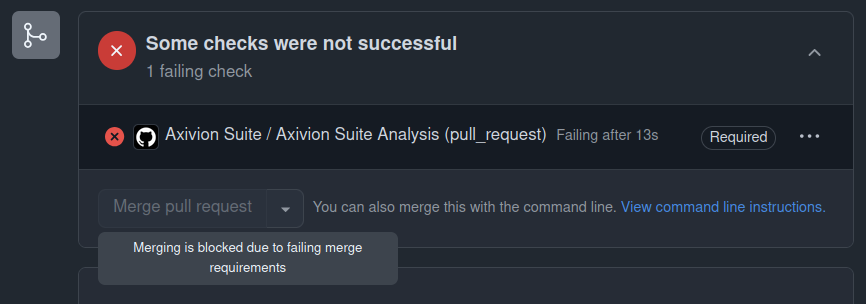
Status checks at the bottom of the PR. Here, the Axivion Suite check is failing due to some issues it found.
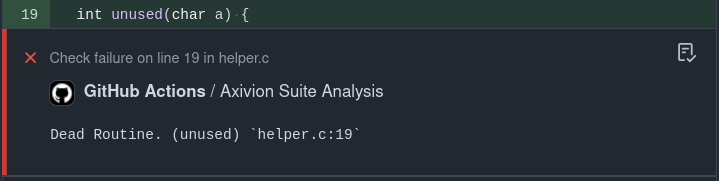
An annotation (error report type) shown within the diff (“Files changed”) tab.
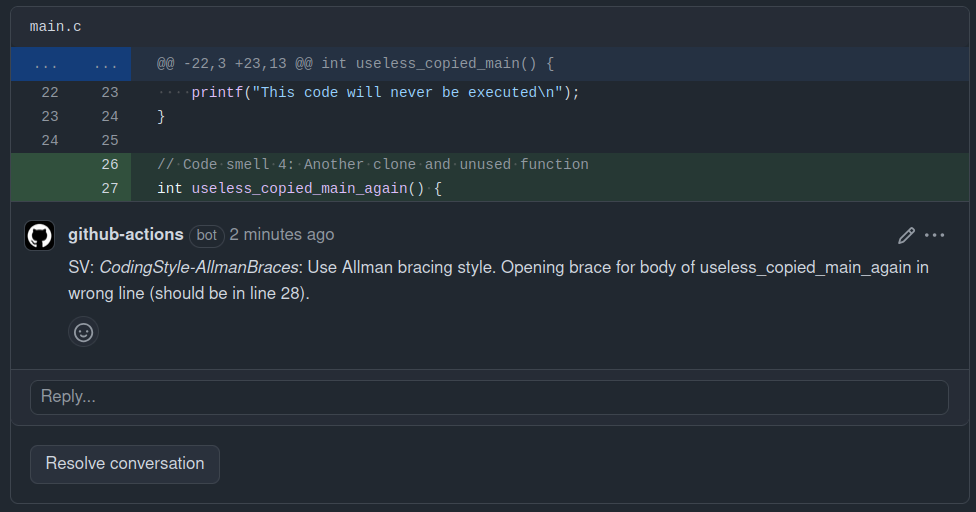
A comment (comment/request_changes report type) shown on the PR overview tab. These types of comments are also included in the diff (“Files changed”) tab.
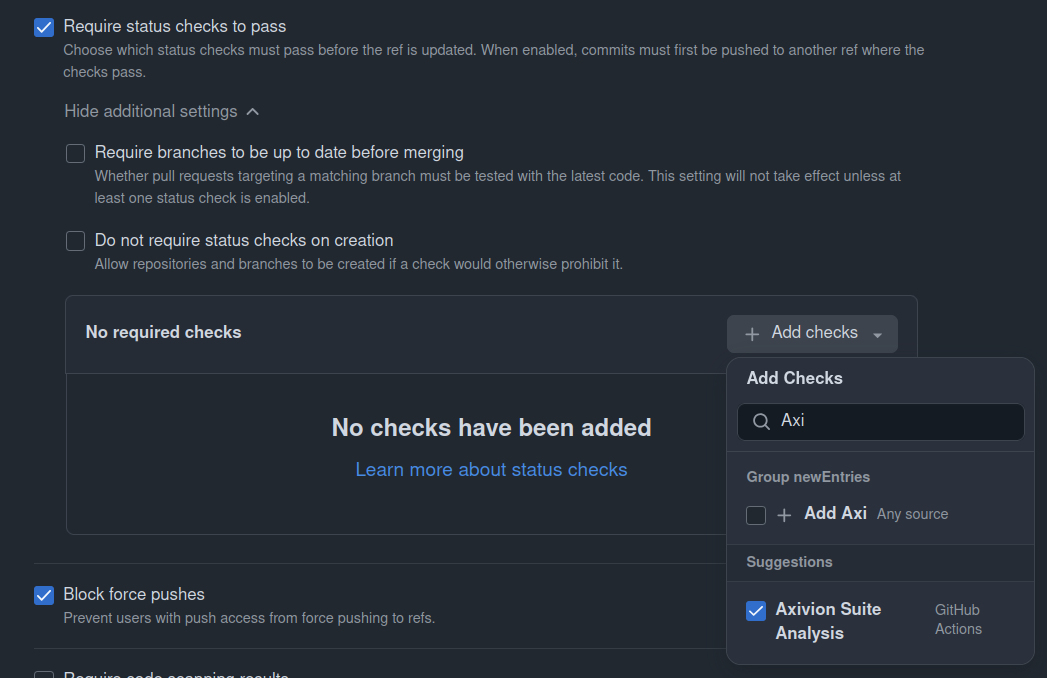
Here (within the branch rulesets configuration), you can require the Axivion Suite to successfully run before a PR can be merged.