Export to QML
Export writes your whole project as QML files that developers can use in a Qt application: one folder for each page and one file for each layer.
Export a project
- Open the project.
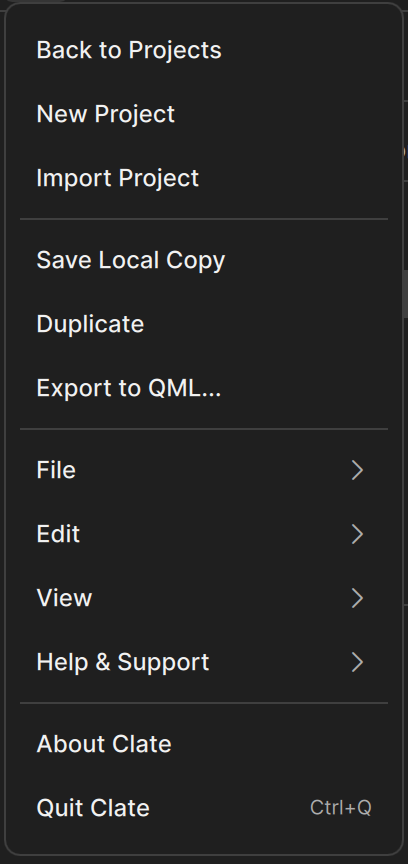
- Open the main menu (the Clate button at the left of the toolbar) and choose Export to QML....
- In the Export to QML — Select Output Directory dialog, choose a folder.
Clate writes the files and the dialog closes. Clate does not show a message when the export is finished, so check the folder to see the result. If the export fails, Clate shows a message with the reason.
Choose an empty folder. Clate overwrites files that have the same name, but it never deletes files. If you export into the same folder again, files of layers that you renamed or deleted stay in the folder.
What you get
The export has one folder for each page, and one file for each layer on that page.
Export folder
├── <Project>/Assets/        images used in the project (only if there are images)
│   ├── Assets.qml
│   ├── qmldir
│   └── images/
├── <Page name>/             one folder for each page
│   ├── qmldir
│   ├── <layer name>.qml     one file for each layer
│   └── ...
└── <Another page>/
- Pages become folders. A page without any object is not exported.
- Layers become QML files. A layer is a top-level object on the page, at the top level of the Layers panel, for example a frame with everything inside it.
- Images: Clate writes them to an
Assetsfolder with a file that lists them, so the QML can refer to them by name.
How names are made
Clate turns the names you gave pages and layers into names that QML accepts:
- Letters and digits are kept. Clate removes or replaces other characters, including accented letters and spaces.
- A name that starts with a digit gets an underscore in front of it. For example, 01 Controls becomes
_01_controls.qml. - If two names would be the same, Clate adds a number to the second one.
- Pages that have no name get a name from their title.
The first export can add an entry to the undo history, because Clate gives pages their export names. That is normal.
How your design becomes QML
| In Clate | In QML |
|---|---|
| Frame | A rectangle that clips its content |
| Rectangle | A Rectangle with its fill, outline, and rounded corners. Rectangles with gradients or special outlines become the matching shape type of Qt Quick Shapes. |
| Ellipse, polygon, star | The matching shape types of the Qt Quick Shapes design helpers |
| Gradient | A gradient with its color stops |
| Text | Text with its font, color, and alignment |
| Image | Image that refers to the exported file |
| Colors | Color values, with transparency where used |
The x and y position of a layer on the page is not exported, so each layer starts at the top-left corner.
Limits
- Clate exports only images as assets.
- Settings that Clate cannot express in QML are left out without a message.
- Clate does not export page groups. It exports each page on its own.