
Qt Quick 3D Physics - Exemple d'articulations
Cet exemple illustre l'utilisation des articulations dans une scène physique.
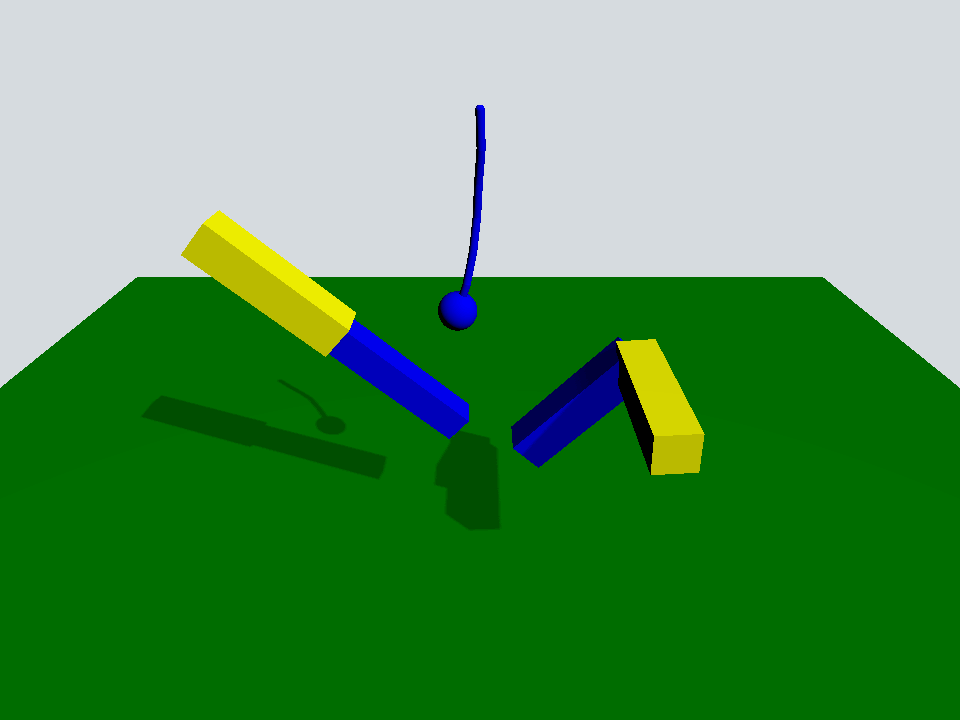
Cet exemple illustre l'utilisation de quelques-unes des articulations disponibles dans Quick 3D Physics.
La scène est une scène classique comprenant un « PhysicsWorld », un « View3D » avec un « PerspectiveCamera » et un « DirectionalLight » :
Window {
    width: 640
    height: 480
    visible: true
    title: qsTr("Qt Quick 3D Physics - Joints")

    PhysicsWorld {
        scene: viewport.scene
        running: true
    }

    View3D {
        id: viewport
        anchors.fill: parent

        environment: SceneEnvironment {
            clearColor: "#d6dbdf"
            backgroundMode: SceneEnvironment.Color
        }

        PerspectiveCamera {
            position: Qt.vector3d(0, 600, 700)
            eulerRotation: Qt.vector3d(-30, 0, 0)
            clipFar: 5000
            clipNear: 1
        }

        DirectionalLight {
            eulerRotation.x: -45
            eulerRotation.y: 45
            castsShadow: true
            brightness: 1
            shadowFactor: 50
            shadowMapQuality: Light.ShadowMapQualityHigh
        }

        Rope {
            eulerRotation: Qt.vector3d(0, 0, -90)
            position: Qt.vector3d(0, 500, 0)
        }

        Prismatic {
            id: prismatic
            position: Qt.vector3d(-250, 100, 0)
        }

        Revolute {
            id: revolute
            position: Qt.vector3d(200, 200, 100)
        }

        StaticRigidBody {
            position: Qt.vector3d(0, -100, 0)
            eulerRotation: Qt.vector3d(-90, 0, 0)
            collisionShapes: PlaneShape {}
            Model {
                source: "#Rectangle"
                scale: Qt.vector3d(20, 20, 1)
                materials: PrincipledMaterial {
                    baseColor: "green"
                }
                castsShadows: false
                receivesShadows: true
            }
        }

        FrameAnimation {
            id: animator
            running: true
            onTriggered: {
                prismatic.jointRotation.z += 1
                revolute.jointRotation.x += 0.95
            }
        }
    }
}
Il y a un « StaticRigidBody » avec un « PlaneShape » qui sert de sol, ainsi que trois objets QML personnalisés : « Rope », « Prismatic » et « Revolute ».
Rope {
    eulerRotation: Qt.vector3d(0, 0, -90)
    position: Qt.vector3d(0, 500, 0)
}

Prismatic {
    id: prismatic
    position: Qt.vector3d(-250, 100, 0)
}

Revolute {
    id: revolute
    position: Qt.vector3d(200, 200, 100)
}
L’objet Rope est constitué d’une série de capsules et d’une sphère reliées par des « spherical joints » pour les capsules et par un « fixed joint » pour la sphère.
Node {
    id: root

    SphericalJoint {
        bodyB: shape0
        positionA: root.position
        positionB: Qt.vector3d(-20, 0, 0)
    }

    SphericalJoint {
        bodyA: shape0
        bodyB: shape1
        positionA: Qt.vector3d(20, 0, 0)
        positionB: Qt.vector3d(-20, 0, 0)
    }

    SphericalJoint {
        bodyA: shape1
        bodyB: shape2
        positionA: Qt.vector3d(20, 0, 0)
        positionB: Qt.vector3d(-20, 0, 0)
    }

    SphericalJoint {
        bodyA: shape2
        bodyB: shape3
        positionA: Qt.vector3d(20, 0, 0)
        positionB: Qt.vector3d(-20, 0, 0)
    }

    SphericalJoint {
        bodyA: shape3
        bodyB: shape4
        positionA: Qt.vector3d(20, 0, 0)
        positionB: Qt.vector3d(-20, 0, 0)
    }

    SphericalJoint {
        bodyA: shape4
        bodyB: shape5
        positionA: Qt.vector3d(20, 0, 0)
        positionB: Qt.vector3d(-20, 0, 0)
    }

    FixedJoint {
        bodyA: shape5
        bodyB: sphere
        positionA: Qt.vector3d(20, 0, 0)
        positionB: Qt.vector3d(0, 0, 0)
    }

    DynamicRigidBody {
        id: shape0
        position: Qt.vector3d(0, 0, 0)
        collisionShapes: CapsuleShape {
            diameter: 10
            height: 40
        }
        Model {
            geometry: CapsuleGeometry {
                diameter: 10
                height: 40
            }
            materials: PrincipledMaterial {
                baseColor: "blue"
            }
        }
    }

    DynamicRigidBody {
        id: shape1
        position: Qt.vector3d(40, 0, 0)
        collisionShapes: CapsuleShape {
            diameter: 10
            height: 40
        }
        Model {
            geometry: CapsuleGeometry {
                diameter: 10
                height: 40
            }
            materials: PrincipledMaterial {
                baseColor: "blue"
            }
        }
    }

    DynamicRigidBody {
        id: shape2
        position: Qt.vector3d(80, 0, 0)
        collisionShapes: CapsuleShape {
            diameter: 10
            height: 40
        }
        Model {
            geometry: CapsuleGeometry {
                diameter: 10
                height: 40
            }
            materials: PrincipledMaterial {
                baseColor: "blue"
            }
        }
    }

    DynamicRigidBody {
        id: shape3
        position: Qt.vector3d(120, 0, 0)
        collisionShapes: CapsuleShape {
            diameter: 10
            height: 40
        }
        Model {
            geometry: CapsuleGeometry {
                diameter: 10
                height: 40
            }
            materials: PrincipledMaterial {
                baseColor: "blue"
            }
        }
    }

    DynamicRigidBody {
        id: shape4
        position: Qt.vector3d(160, 0, 0)
        collisionShapes: CapsuleShape {
            diameter: 10
            height: 40
        }
        Model {
            geometry: CapsuleGeometry {
                diameter: 10
                height: 40
            }
            materials: PrincipledMaterial {
                baseColor: "blue"
            }
        }
    }

    DynamicRigidBody {
        id: shape5
        position: Qt.vector3d(200, 0, 0)
        collisionShapes: CapsuleShape {
            diameter: 10
            height: 40
        }
        Model {
            geometry: CapsuleGeometry {
                diameter: 10
                height: 40
            }
            materials: PrincipledMaterial {
                baseColor: "blue"
            }
        }
    }

    DynamicRigidBody {
        id: sphere
        position: Qt.vector3d(240, 0, 0)
        scale: Qt.vector3d(0.5, 0.5, 0.5)
        collisionShapes: SphereShape {}
        Model {
            source: "#Sphere"
            materials: PrincipledMaterial {
                baseColor: "blue"
            }
        }
    }
}
L’objet Prismatic est constitué de deux barres verrouillées par une articulation « prismatic joint » le long de leur axe x commun. Grâce à cette articulation, la plus petite des deux barres peut se déplacer librement le long de cet axe x jusqu’à atteindre sa limite de contrainte « upper » et « lower ».
Node {
    id: root
    property vector3d jointRotation : Qt.vector3d(0, 0, 0)

    PrismaticJoint {
        bodyA: prismaticBoxA
        bodyB: prismaticBoxB
        lowerLimit: -200
        upperLimit: 0
        positionA: Qt.vector3d(100, 0, 0)
        positionB: Qt.vector3d(-100, 0, 0)
    }

    DynamicRigidBody {
        id: prismaticBoxA
        kinematicPosition: Qt.vector3d(0, 200, 0)
        kinematicEulerRotation: root.jointRotation
        isKinematic: true
        scale: Qt.vector3d(2, 0.5, 0.5)
        collisionShapes: BoxShape {}
        Model {
            source: "#Cube"
            materials: PrincipledMaterial {
                baseColor: "yellow"
            }
        }
    }

    DynamicRigidBody {
        id: prismaticBoxB
        position: Qt.vector3d(0, 0, 0)
        scale: Qt.vector3d(2, 0.4, 0.4)
        collisionShapes: BoxShape {}
        Model {
            source: "#Cube"
            materials: PrincipledMaterial {
                baseColor: "blue"
            }
        }
    }
}
L’objet « Revolute » est constitué de deux barres tournées de 90 degrés et verrouillées par une « revolute joint ».
Node {
    id: root
    property vector3d jointRotation : Qt.vector3d(0, 90, 0)

    RevoluteJoint {
        bodyA: revoluteBoxA
        bodyB: revoluteBoxB
        positionA: Qt.vector3d(100, 0, 0)
        positionB: Qt.vector3d(100, 0, 0)
        orientationB: Quaternion.fromEulerAngles(0, 0, 90)
        angularLimitLower: -Math.PI / 4
        angularLimitUpper: Math.PI / 4
        enableAngularLimit: true
    }

    DynamicRigidBody {
        id: revoluteBoxA
        kinematicPosition: Qt.vector3d(0, 0, 0)
        kinematicEulerRotation: root.jointRotation
        isKinematic: true
        scale: Qt.vector3d(2, 0.5, 0.5)
        collisionShapes: BoxShape {}
        Model {
            source: "#Cube"
            materials: PrincipledMaterial {
                baseColor: "yellow"
            }
        }
    }

    DynamicRigidBody {
        id: revoluteBoxB
        position: Qt.vector3d(0, 100, -100)
        eulerRotation: Qt.vector3d(0, 90, -90)
        scale: Qt.vector3d(2, 0.5, 0.5)
        collisionShapes: BoxShape {}
        Model {
            source: "#Cube"
            materials: PrincipledMaterial {
                baseColor: "blue"
            }
        }
    }
}
Pour revenir à la scène principale, on y trouve un objet « FrameAnimation » qui fait pivoter les articulations cinématiques prismatic et revolute.
FrameAnimation {
    id: animator
    running: true
    onTriggered: {
        prismatic.jointRotation.z += 1
        revolute.jointRotation.x += 0.95
    }
}
Avec toutes ces pièces mobiles, on peut observer comment les différentes articulations interagissent dans une scène physique.
Fichiers :
© 2026 The Qt Company Ltd. Documentation contributions included herein are the copyrights of their respective owners. The documentation provided herein is licensed under the terms of the GNU Free Documentation License version 1.3 as published by the Free Software Foundation. Qt and respective logos are trademarks of The Qt Company Ltd. in Finland and/or other countries worldwide. All other trademarks are property of their respective owners.
